





Last Updated on February 4, 2026 by DarkNet
TrashMail creates disposable email aliases that forward to your real inbox. Here is a clear, security-minded review of its strengths, weaknesses, and alternatives.
What TrashMail Is and What It’s Designed to Do
Disposable email vs email aliasing: clarifying terms
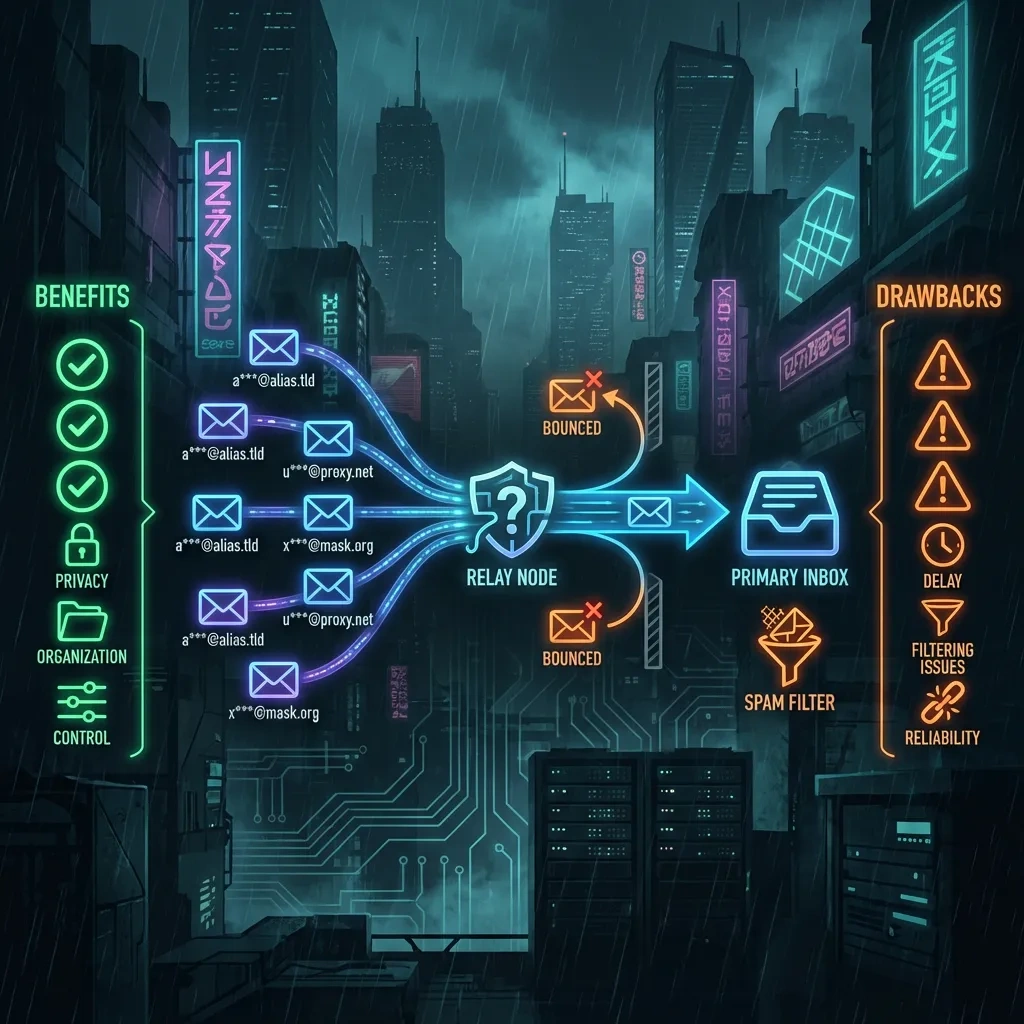
TrashMail is an email aliasing and forwarding service. You create a temporary alias at a TrashMail domain, and incoming messages to that alias are forwarded to your real inbox. Unlike a permanent email account, the alias can expire or be deleted at will. This is useful for sign-ups where you do not want to expose your primary address.
Two patterns are often conflated:
- Disposable inbox services, sometimes called temporary mail or throwaway mail, provide a mailbox you access directly for a short time. No forwarding is required.
- Email aliasing and forwarding services, like TrashMail, create an alias that forwards to your existing inbox. You keep using your main provider but do not reveal its address.
TrashMail fits the second pattern. Official site: trashmail.com.
Typical use cases: newsletters, trials, one-time registrations
- Newsletter sign-ups where you want a low-friction way to unsubscribe by deleting the alias.
- Free trials or one-time registrations that may send marketing follow-ups.
- Classifieds or marketplace listings where you expect replies for a short window.
- Compartmentalizing mailing lists or communities to protect your main address from scraping and leaks.
What TrashMail is not: avoiding misconceptions about anonymity
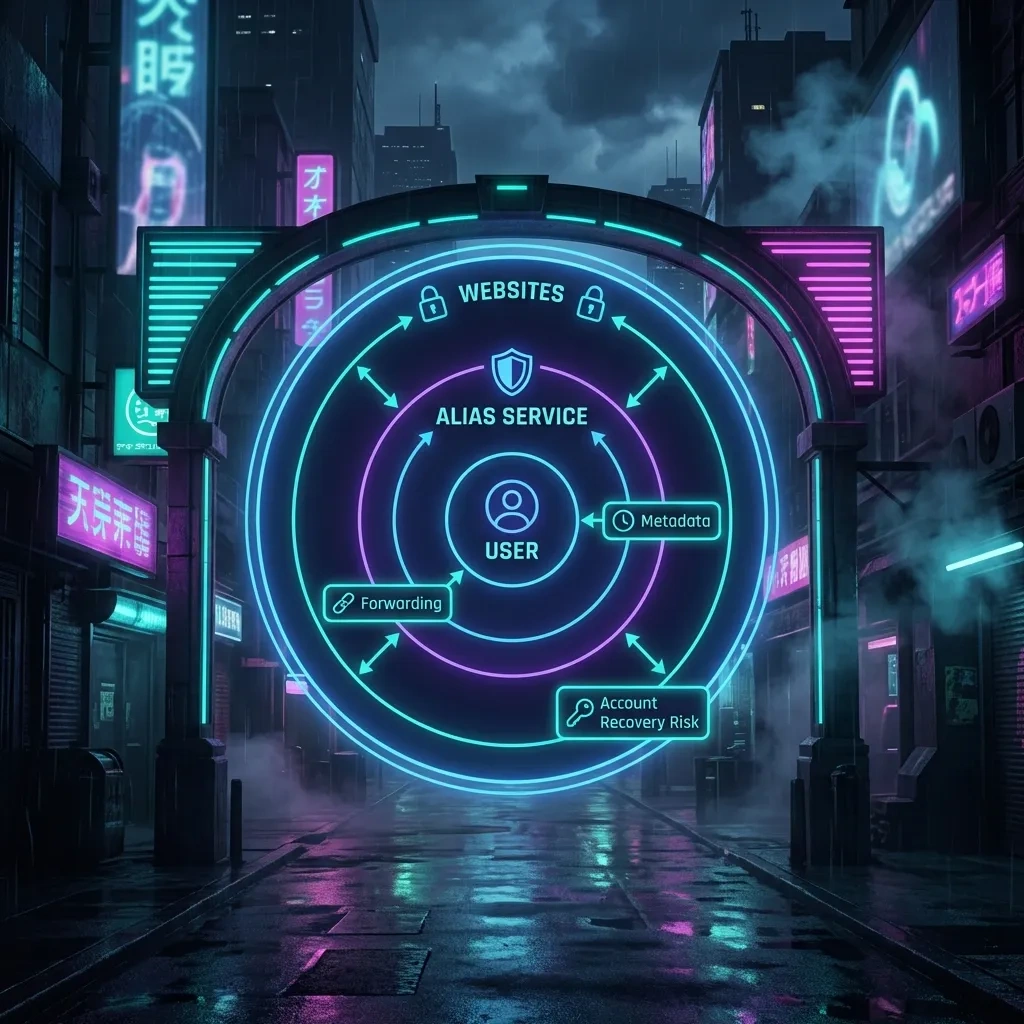
TrashMail does not make you anonymous. An alias hides your real address from a site, but the service can see forwarding details, and normal email metadata still exists. Aliasing does not remove IP addresses, timestamps, or routing data within email headers as defined by standards like RFC 5322 and RFC 5321. Use aliasing for inbox hygiene, spam reduction, and compartmentalization, not for evasion.
How TrashMail Works: Aliases, Forwarding, and Expiration
Creating an alias and choosing a lifetime or usage limit
With TrashMail you pick an alias name at a supported domain, then set a lifetime or message limit. Once the limit is hit or the time window closes, the alias stops forwarding. This lets you bind the alias to a specific project or trial period without long-term exposure.
Forwarding to a real inbox and reply behavior
New messages to the alias are relayed to your main email. Some providers also support replying through the alias so recipients see the alias in the From header. Reply support can vary and may affect SPF, DKIM, and DMARC alignment. See SPF, DKIM, and DMARC RFCs for background.
Managing and deleting aliases: dashboards and controls
You manage aliases in a web dashboard: view active aliases, see forwarding status, adjust lifetime settings, and delete aliases. Deleting an alias cuts off future messages, which is effective for unsubscribing at scale.
Key Benefits: Where TrashMail Helps in Real Life
Reducing spam and keeping your main inbox clean
- Create one alias per site so unsolicited mail is isolated. When it becomes noisy, disable that alias.
- Use time-limited aliases for short-term interactions, then let them expire.
Limiting data exposure during breaches and leaks
If a site leaks addresses, the alias limits the blast radius. You can kill the alias rather than dealing with spam to your primary address. This is basic compartmentalization, not a guarantee of privacy.
Compartmentalization: separating identities across services
- Use one alias per vendor so you can identify which site leaked or sold your address.
- Keep hobby communities separate from work and finance accounts.
- Use custom labels in a password manager so you can trace aliases to accounts quickly.
Main Drawbacks: Where TrashMail Falls Short
Single point of failure: provider and account lockout risk
If you rely on a forwarding alias to access a site and lose access to TrashMail, you can get locked out of that site. A provider outage or policy enforcement can break password resets or notices that only reach that alias.
Reply and send limitations and workflow friction
Replying through an alias may be limited or add complexity. Mail authentication alignment can fail when forwarding and rewriting headers. This may cause some destinations to flag or reject replies. Expect friction if you need ongoing back and forth conversations through an alias.
Long-term account recovery and continuity challenges
Aliases that expire or get deleted can break account recovery. For anything that matters long term, use a stable address you control and maintain recovery methods like TOTP 2FA backup codes and secondary addresses.
Security and Privacy Considerations (Threat Model Perspective)
What metadata still exists: IP, timestamps, forwarding logs
Aliasing hides your real address from the site but does not remove email metadata. SMTP routing adds timestamps and server trace data. A forwarding provider may log sender details, subject lines, and delivery status. This is normal email behavior per SMTP and message format standards.
Account security: passwords, 2FA options, and recovery
- Use a strong, unique password for your TrashMail account and your primary email account. See NIST guidance in SP 800-63B.
- Enable 2FA where available and store backup codes offline. An attacker who controls your aliasing account can intercept resets for accounts tied to those aliases.
- Document recovery paths. If an alias expires and a site only uses that email for resets, you may lose access.
Legal and process risk: provider policies and jurisdiction basics
Providers operate under local laws and their own acceptable use policies. They may suspend domains or accounts if abuse is detected. Review the provider’s policy and terms of service. For reference, see the official pages for TrashMail, SimpleLogin, AnonAddy, and Firefox Relay.
Deliverability and Compatibility: Sign-ups, Spam Filters, and Blocklists
Sites that reject disposable domains: what to expect
Some services block known disposable domains during sign-up to reduce abuse. Expect occasional rejections. This is a policy choice by the destination site, not an error to work around.
Forwarding delays, missing mail, and troubleshooting
- Check your primary inbox spam or junk folder and any quarantine your provider uses.
- Verify the alias is active and has not hit a lifetime or message limit.
- Review any provider status page for incidents. If available, check logs in your alias dashboard.
- Whitelist sender domains in your primary mailbox if your provider allows safe senders.
- Ask the sender to try again or use another channel if it is time sensitive.
Mitigating false positives: domain choices and hygiene
- Prefer stable aliases for accounts that must receive critical mail. Avoid tight expiration for recovery flows.
- Keep your primary mailbox healthy: avoid auto forwarding loops and ensure filters are accurate.
- When replying via an alias, be aware that authentication alignment may differ. Some destinations are strict about DMARC or SPF alignment.
Pricing, Limits, and Plan Comparison: What You Actually Get
Free vs paid tiers: limits that matter
Providers usually limit the number of aliases, lifetime options, monthly forwarding volume, and reply support. Exact limits change. Check the provider’s official pages before committing.
Value assessment: when upgrading makes sense
- You need more aliases for separate projects and newsletters.
- You want reply support, additional domains, or longer alias lifetimes.
- You want better throughput for high volume mail like list digests.
Hidden costs: time, failed sign-ups, and migration
Costs are not only monetary. There is friction when sites block disposable domains, and migration can be painful if you used an alias for critical accounts. Balance privacy gains against potential lockouts and time spent troubleshooting.
TrashMail vs Alternatives: SimpleLogin, AnonAddy, Firefox Relay, and Temp Mail
Feature comparison: custom domains, catch all, PGP, API access
Here is a high level, vendor neutral view. Details change, so consult official documentation for current capabilities.
| Service | Type | Custom domain | Catch all | PGP option | API | Reply support | Open source | Ecosystem integration | Notes |
|---|---|---|---|---|---|---|---|---|---|
| TrashMail | Alias forwarding | Varies, check official site | Varies | Unclear, check docs | Unclear | Often limited | Proprietary | Web dashboard | Focus on time limited aliases |
| SimpleLogin | Alias forwarding | Yes | Yes | Yes | Yes | Yes | Partially open | Mail client aliases, browser extensions | Supports custom domains and PGP |
| AnonAddy | Alias forwarding | Yes | Yes | Yes | Yes | Yes | Open source server | CLI and API | Self-hosting possible |
| Firefox Relay | Alias forwarding | Limited custom domains | Limited | No PGP | Limited | Yes | Proprietary | Deep Firefox integration | Good for browser based sign-ups |
| Temporary inbox category | Temporary mailbox | No | No | No | Typically no | N/A | Varies | Standalone web inbox | Use only when you do not need replies or recovery |
Privacy posture and ecosystem integration
Some alternatives emphasize open source, end to end PGP with forwarding, or browser integration. Evaluate whether you want a service you can self host, a browser integrated flow, or stronger cryptographic features. Review vendor privacy policies on their official sites.
When a temporary inbox is better than an alias service
- When you truly do not need replies or long-term access.
- When you want to avoid forwarding altogether and keep the mail isolated from your primary account.
- For short lived test accounts or one time content downloads that do not tie back to anything important.
Best Practices for Using Disposable Email Responsibly
Use cases to avoid: anything requiring long term recovery
- Banking, taxes, health portals, employment, legal, government identifiers.
- Any account where you might need recovery years later.
Operational tips: labeling, vaulting, and alias naming schemes
- Use a password manager to store each alias with the associated site and notes on creation date and lifetime.
- Adopt a naming scheme, for example sitename.month.year at provider domain, so you can recognize context quickly.
- Group aliases by project or risk level and set reminders before expiration if the site matters.
Safer layering: unique passwords, password managers, 2FA
- Use unique passwords everywhere and store them in a reputable password manager. See OWASP guidance on authentication best practices: OWASP Authentication Cheat Sheet.
- Enable TOTP 2FA where available and keep printed backup codes offline.
- Avoid SMS 2FA on accounts that matter if you can choose TOTP or security keys.
FAQ
Is TrashMail anonymous?
No. It hides your real address from a site, but normal email metadata, provider logs, and legal processes can still apply. Use aliasing for inbox hygiene and compartmentalization, not for secrecy.
How long do TrashMail aliases last?
It depends on the lifetime or message limits you choose when creating the alias. Check the provider documentation for current options.
Can I receive verification codes or 2FA over TrashMail?
Many verification emails will arrive, but relying on an expiring alias for account recovery is risky. For important accounts, use a stable address and a robust 2FA setup with backup codes.
Why am I not getting forwarded emails?
Common reasons include expired aliases, spam filtering in your primary inbox, sender blocks on disposable domains, or provider delays. Check your spam folder, verify alias status, and review provider status pages.
Is using TrashMail legal?
Generally yes for legitimate purposes like privacy and spam control. You must follow the provider’s terms and the destination site’s policies.
Can I reply through TrashMail?
Some providers allow it, sometimes with limitations. Mail authentication alignment can affect deliverability for replies. Expect occasional rejections.
Should I use TrashMail for banking or government accounts?
No. Use a stable, long term address you control, plus 2FA and backup recovery methods.
How does TrashMail compare to SimpleLogin and AnonAddy?
SimpleLogin and AnonAddy emphasize features like custom domains, catch all, PGP, and APIs. TrashMail focuses on straightforward forwarding and time limited aliases. Pick based on features you need. See SimpleLogin and AnonAddy.
Does TrashMail support PGP?
Support varies and may be limited. If PGP forwarding is essential, review providers that document it clearly, such as AnonAddy or SimpleLogin.
What happens if my alias provider goes down or suspends my account?
You may miss messages and lose access to resets sent to those aliases. This is why aliases are not recommended for critical accounts.
Bottom Line: Who Should Use TrashMail (and Who Shouldn’t)
Ideal user profiles and scenarios
- Privacy minded users who want to reduce spam and compartmentalize newsletter sign-ups.
- Developers and testers who frequently create accounts for staging or QA.
- Darknet and security enthusiasts who practice compartmentalization for low risk accounts.
When to choose a custom domain aliasing solution instead
- When you want long term control over addresses and the option to move between providers.
- When you need catch all routing, PGP, or API automation.
- When you want reply support with better authentication alignment.
Decision checklist: quick yes or no criteria
- Need fast one time sign-ups and easy unsubscribe by deletion: Yes.
- Require reliable long term recovery and continuity: No.
- Need automation, custom domains, or PGP: Consider alternatives.
- Aliases hide your real address but do not make you anonymous.
- Great for newsletters and trials, risky for banking or government logins.
- Expect some sign-up blocks and occasional deliverability issues.
- For advanced features and control, consider SimpleLogin, AnonAddy, or Firefox Relay.
- Use unique passwords, 2FA, and keep recovery paths stable.








