Last Updated on February 14, 2026 by DarkNet
This security-first review explains how Hushmail’s encryption and policies work, where privacy limits appear, and who should consider alternatives based on risk.
What Hushmail Is and Who It’s For
Canada-based hosting and compliance context
Hushmail is a paid, security-focused email provider based in Canada. Its infrastructure and staff are subject to Canadian law and court orders, and Canada participates in cross-border legal assistance. That context matters for privacy expectations. Providers can be compelled to disclose data they have, including metadata and any unencrypted content. See Hushmail’s stated approach to security and privacy on its official pages for the latest details: Security and Privacy policy.
Who benefits from Hushmail and who should look elsewhere
- Good fit: professionals who want simpler encrypted email workflows, especially healthcare and small businesses that need secure web forms, e-signatures, and HIPAA-aligned features.
- Maybe: privacy-minded individuals who value support and account recovery over maximum deniability.
- Look elsewhere: high-risk users who need stronger resistance to provider access, more metadata minimization, and stricter jurisdictional posture.
Common myths about secure email and expectations
- Myth: Secure email means full anonymity. Reality: Email leaves trails. IP logs, headers, and payment records can correlate activity.
- Myth: Encryption hides everything. Reality: Subject lines and routing metadata are typically visible. Content may be protected, but context often is not.
- Myth: Recovery-friendly means safe. Reality: Easy recovery can imply provider involvement with keys or data that lowers confidentiality under pressure.
How Hushmail Encryption Works (and Where It Doesn’t)
Provider-managed keys vs true end to end
Hushmail supports encrypted messaging between Hushmail users and offers compatibility with OpenPGP concepts derived from the IETF OpenPGP standard. In typical Hushmail workflows, key handling and encryption steps are managed by the provider to keep things usable. This improves onboarding and recovery, but it also means you depend on Hushmail’s systems and policies for confidentiality. In contrast, strict end-to-end encryption with user-held keys reduces reliance on the provider but usually raises complexity and risk if you lose keys.
Secure messages to non users with passphrases
Hushmail can send secure messages to recipients who do not use Hushmail. The sender sets a passphrase or uses a question and answer. The recipient gets a link to a secure page where they enter the passphrase to view the message. This is practical for clients and patients. However, the provider still brokers the delivery and can see metadata associated with the transaction, such as sender and recipient addresses and time of access.
What encryption hides vs what metadata exposes
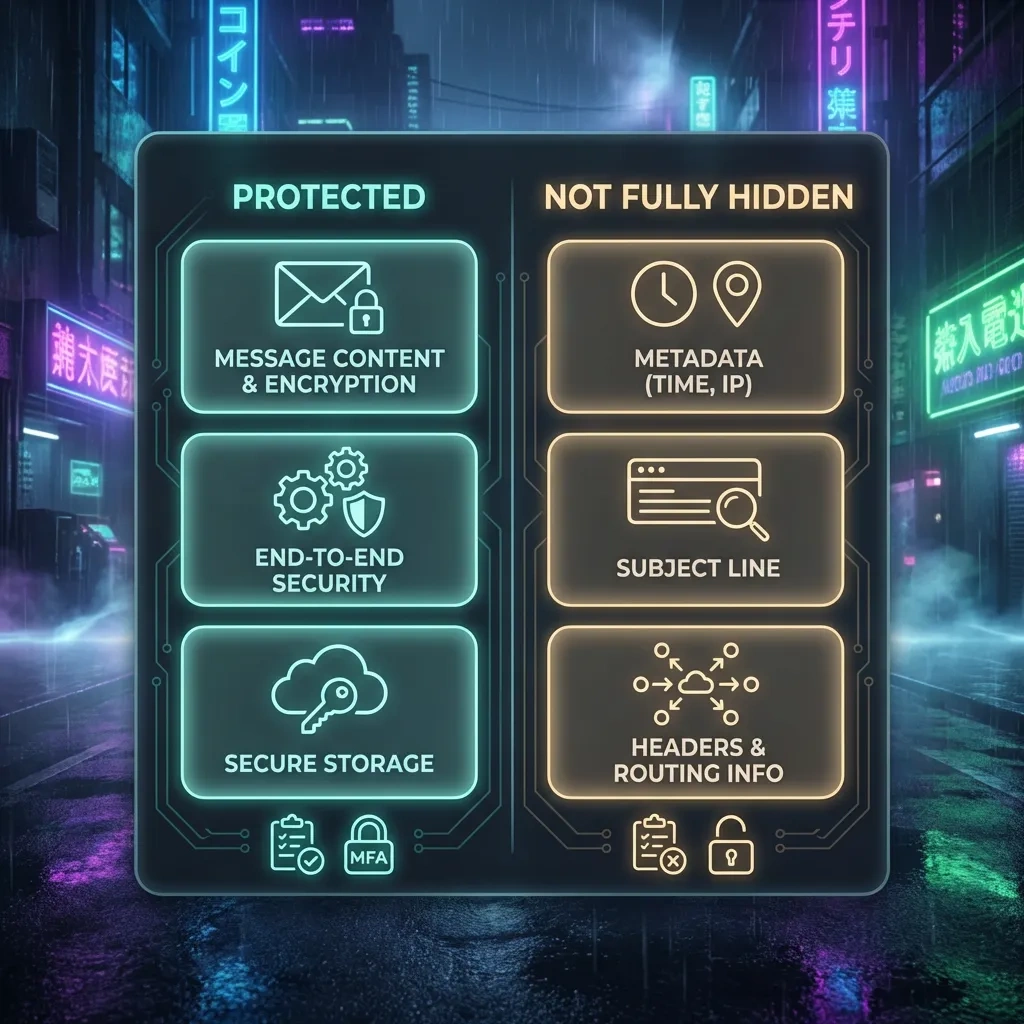
What Hushmail protects: the body of encrypted messages, attachments when encrypted, and secure portal content shared behind a passphrase.
What Hushmail cannot protect by design: sender and recipient addresses, timestamps, mail routing headers, and usually the subject line. Web server and access logs can exist. Device fingerprints and IP addresses may be recorded for security reasons. These exposures are typical across email systems, not unique to Hushmail.
Key Advantages: Usability, Support, and Business Features
Onboarding and recovery that most users can handle
- Clean webmail with encryption flows integrated into compose and read views.
- Provider-managed key handling reduces setup friction and key loss risk.
- Account recovery options exist, which is friendlier than strict self-managed PGP.
Healthcare friendly forms and compliance tools
- Secure web forms and e-signature options for intake and consent streamline patient communication.
- Business plans are designed with US healthcare customers in mind. HIPAA is a US regulation explained by HHS here: HHS HIPAA overview. Confirm your legal responsibilities and business associate agreements directly with Hushmail.
Web and mobile access with human support
- Accessible through webmail, with mobile access options. Avoids complex desktop PGP setup for most use cases.
- Responsive support helps small teams adopt encrypted email without specialist staff.
Key Drawbacks: Trust Model, Metadata, and Legal Exposure
Provider trust and key handling tradeoffs
- Provider-managed encryption increases reliance on Hushmail’s infrastructure and policies for confidentiality.
- Recovery features that save users from lockout can expand the set of circumstances where the provider can assist or be compelled to assist.
Metadata, subject lines, IP logs still exist
- Email protocols expose routing headers and usually subject lines. This is not unique to Hushmail.
- Web access may create logs for security and abuse mitigation. These can be requested by authorities where lawful and applicable.
Legal process reality in Canada and cross border
- As a Canadian company, Hushmail can be required to comply with valid Canadian legal orders.
- Cross-border assistance can occur under applicable frameworks. Providers generally disclose data they have and are permitted or required to share under the law and their policies.
Threat Model Fit: When Hushmail Makes Sense vs When It Doesn’t
Low risk: everyday privacy and spam control
If you want better privacy than mainstream free webmail and value support, Hushmail can raise your baseline. It reduces exposure of message contents to casual snooping and offers secure messaging to non-users. Accept that metadata remains visible and keep expectations realistic.
Medium risk: compliance driven professionals
Small clinics, therapists, lawyers, and boutique firms often need encrypted communications, forms, and signatures without hiring infosec staff. For these teams, Hushmail’s managed model and business features can be a balanced choice, provided you understand logging and recovery implications and maintain strong endpoint security.
High risk: investigative journalists and activists
High exposure subjects with capable adversaries often need stronger end-to-end models with user-held keys, minimized logs, and stricter jurisdictions. Consider services and workflows that reduce provider access and metadata footprint. Hushmail is usually not the best fit at this risk level.
Privacy and Security Settings Checklist for New Users
Account hardening essentials
- Use a long, unique password. Store it in a reputable password manager.
- Enable two-factor authentication if available. Prefer app-based or hardware key methods over SMS.
- Review recovery settings. Limit recovery vectors to what you actually need.
Phishing and device hygiene
- Beware of passphrase link phishing. Verify sender context before opening secure message portals.
- Keep browsers, OS, and antivirus up to date. Browser extensions can leak data, so audit and minimize them.
- Lock devices and encrypt local storage. Email often caches sensitive files.
Retention, minimization, and backups
- Delete sensitive threads once no longer needed. Reduce mailbox footprint to limit breach impact.
- Disable image autoloading and read receipts to reduce tracking.
- Back up only what you must. If exporting mail, encrypt backups at rest.
Pricing, Plans, and Real-World Value
Personal vs business plans and storage
Hushmail offers paid plans for individuals and businesses with storage quotas and features that scale up for teamwork, compliance, and secure forms. There is no perpetual free tier. Expect to pay for additional storage, custom domains, and advanced business capabilities.
Custom domains, migration, and lock in
- Custom domain support is available on business plans. Verify DNS and email authentication requirements before migrating.
- Plan your exit path. Maintain your own domain so you can switch providers without disrupting addresses.
- Export options matter. Know how to export mail in standard formats if you need to leave.
Support, quotas, and hidden costs
- Support responsiveness is a core value add for non-technical teams.
- Budget for storage upgrades if your workflow includes large attachments or archival requirements.
- Consider compliance documentation and potential business associate agreements if operating in regulated sectors.
Alternatives Compared: Proton Mail, Tutanota, Mailbox.org, Self-Hosted Options
Comparison at a glance
| Provider | Jurisdiction | Encryption Model | Metadata Posture | Custom Domains | Notable Strengths | Tradeoffs |
|---|---|---|---|---|---|---|
| Hushmail | Canada | Provider-managed encryption with OpenPGP compatibility | Typical email metadata visible | Yes on business plans | Usability, secure forms, business support | Provider trust model, legal exposure under Canadian process |
| Proton Mail | Switzerland | End-to-end by default for Proton-to-Proton, optional PGP | Limits on access to content, metadata still exists | Yes on paid plans | Stronger E2EE defaults, ecosystem apps | Subject and external metadata remain, paid features gated |
| Tutanota | Germany | End-to-end with provider-managed keys on device | Custom metadata handling, but routing info persists | Yes on paid plans | Privacy-first design, encrypted contacts and calendars | Interoperability quirks with classic PGP |
| Mailbox.org | Germany | PGP support with strong admin controls | Standard email metadata visible | Yes | Full-featured suite, admin flexibility | More configuration needed for E2EE |
| Self-hosted | Your choice | Depends on setup, often PGP with clients | Metadata still flows over SMTP | Yes | Control over data, policies, and logging | High maintenance, deliverability and security burden |
Which alternative fits which threat model
- Low risk: Hushmail or Mailbox.org offer solid usability with paid support.
- Medium risk: Proton Mail or Tutanota improve end-to-end defaults with good usability for teams.
- High risk: Consider Proton or Tutanota with strict endpoint hardening, or specialized setups using independent PGP and compartmentalized identities. Email may still be the wrong tool at the highest risk.
FAQ: Straight answers to common Hushmail questions
1) Is Hushmail end-to-end encrypted by default?
Hushmail encrypts message content in common workflows, especially between Hushmail users and when using secure message portals. The provider helps manage keys and delivery. This is not the same as strict user-held-key E2EE where the provider cannot assist with recovery.
2) What information can still be exposed?
Typical email metadata such as sender and recipient addresses, timestamps, routing headers, and usually the subject line. Web and access logs may also exist for security and reliability.
3) How secure is Hushmail compared to Proton Mail or Tutanota?
Proton Mail and Tutanota emphasize end-to-end defaults that reduce provider access to content. Hushmail focuses on managed encryption with usability and business workflows. Which is more secure depends on your threat model and how you secure your devices.
4) Can Hushmail read my emails under any circumstances?
The provider manages parts of the encryption workflow and recovery. As with any provider, legal orders can compel disclosure of data they have. Review Hushmail’s security and privacy pages for current practices.
5) Does Hushmail work with custom domains and business accounts?
Yes. Business plans support custom domains, secure web forms, and administrative controls. Confirm plan details and pricing before migrating.
6) Is Hushmail suitable for sensitive professional communication?
Often yes for regulated or compliance-conscious teams that need secure messaging, forms, and support. Ensure that your legal obligations are met and understand the logging and recovery implications.
7) What are the best settings to enable for account security?
Use a long unique password, enable two-factor authentication, limit account recovery vectors, disable external image loading, and review session history regularly.
8) When should I choose a different secure email provider?
If you require stronger end-to-end guarantees with less provider involvement, stricter metadata minimization, or a different jurisdictional posture, consider Proton Mail, Tutanota, or a carefully managed self-hosted and PGP-based workflow.
Bottom Line: Pros and Cons Summary Table
| Pros | Cons |
|---|---|
|
|
- Hushmail protects message content in typical workflows but cannot hide email metadata.
- It is a strong usability choice for regulated or small business teams that need support and forms.
- High-risk users who need stricter end-to-end control and minimized logging should consider alternatives.
- Your device security, password hygiene, and 2FA settings matter as much as the provider choice.