Last Updated on January 29, 2026 by DarkNet
Dashlane is a well-known password manager focused on ease of use, security, and built-in privacy tools. It is popular among individual users and teams who want a modern interface and extra security features beyond basic password storage.
Below is a comprehensive and objective overview of Dashlane, including its strengths and weaknesses.
What Is Dashlane
Dashlane is a password manager that helps users:
- securely store passwords and sensitive data;
- autofill login credentials and forms;
- sync data across devices using the cloud;
- improve online privacy with additional security tools.
Dashlane supports Windows, macOS, iOS, Android, and major web browsers. It primarily operates as a web app with browser extensions.
Core Features
- Secure password and note storage
- End-to-end encryption with zero-knowledge architecture
- Password generator and autofill
- Secure storage for payment information
- Two-factor authentication support
- Dark web monitoring
- Built-in VPN on paid plans
✅ Pros of Dashlane
🔐 High Level of Security
- Strong end-to-end encryption
- Zero-knowledge design ensures no access to user data
- Support for multiple two-factor authentication methods
- Regular security reviews and audits
Dashlane meets modern security standards expected from a premium password manager.
🎨 Modern and User-Friendly Interface
- Clean and visually polished design
- Simple navigation suitable for beginners
- Clear onboarding process
- Easy password management and search
🛡️ Built-In VPN and Monitoring Tools
- Integrated VPN for Wi-Fi protection on premium plans
- Dark web monitoring alerts for compromised accounts
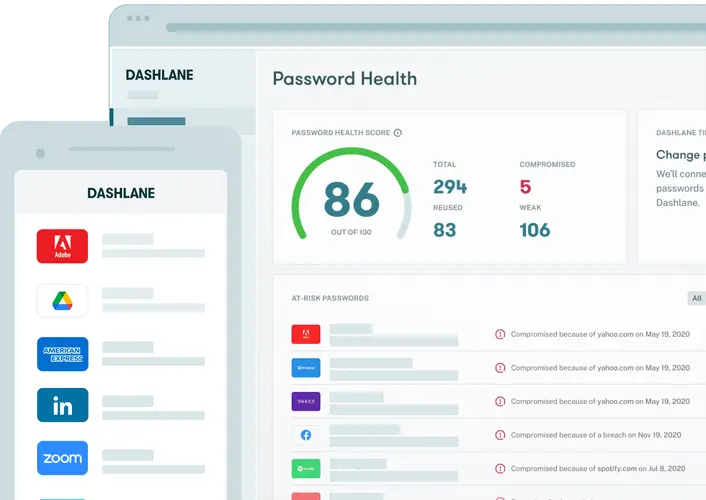
- Security dashboard with actionable recommendations
These features make Dashlane more than just a password manager.
🔄 Reliable Sync and Autofill
- Fast synchronization across devices
- Accurate autofill for logins and forms
- Works well across most popular websites
👨👩👧👦 Business and Team Features
- Team and business plans available
- Centralized admin controls
- User access management and activity tracking
❌ Cons of Dashlane
💰 Limited Free Version
- Free plan supports only one device
- Many advanced features require a paid subscription
- Less flexible compared to competitors with unlimited free sync
🌐 Web-First Experience
- No full-featured standalone desktop apps
- Requires a browser extension for most functionality
- May not appeal to users who prefer native desktop software
⚙️ Fewer Advanced Customization Options
- No official self-hosting option
- Limited control over encryption and infrastructure
- Not ideal for highly technical users
🧑💻 Can Feel Heavy
- Browser extension uses more system resources
- VPN feature may impact performance
- Slower on older or low-end devices
Who Dashlane Is Best For
Recommended if you:
- want an easy-to-use and polished password manager;
- value extra privacy features like VPN and monitoring;
- prefer minimal setup and guided experience;
- need a solution for personal or team use.
Not ideal if you:
- want a strong free plan with unlimited devices;
- require self-hosting or deep customization;
- prefer lightweight or fully offline solutions.
Password Manager Comparison Table 2026
|
Product Name |
Encryption & Zero-Knowledge |
Platform Support |
Key Security Features |
Best For |
|---|---|---|---|---|
|
Yes, strong AES-256 + unique secret key |
All major OS & browsers |
Zero-knowledge, MFA, passkeys, secure sharing |
Premium security & usability |
|
|
Yes, AES-256, open-source |
All major OS & browsers |
Self-hosting option, open audit |
Open-source transparency & budget |
|
|
Yes, AES-256, zero-knowledge |
All major OS & browsers |
VPN (paid), breach monitoring |
Security insights + privacy tools |
|
|
Yes, zero-knowledge |
All major OS & browsers |
Password health, email masking |
Best overall value & simplicity |
|
|
Yes, AES-256 + PBKDF2 |
All major OS & browsers |
Self-destruct, secure sharing |
Enterprise & business focus |
|
|
Yes, encrypted vault |
All major OS & browsers |
Advanced form-filling |
Excellent form automation |
|
|
AES-256 local encryption |
All major OS & browsers |
Local-first vault, optional cloud sync |
Local control, no subscription |
|
|
Yes, AES-256 GCM, open-source |
All major OS & browsers |
End-to-end encryption, CLI access |
Privacy-focused, free tier strong |
|
|
Yes, encrypted vault (mixed fields) |
All major OS & browsers |
Cross-platform sync, 2FA |
Easy access, large user base |
|
|
Yes, encrypted |
Web, apps |
Team sharing, access controls |
Business teams |
|
|
Yes, open-source |
Web & extensions |
Self-hosting, team roles |
Technical & DevOps teams |
|
|
Yes, E2E + hardware |
Web & mobile |
Hardware-first, FIDO2 |
Passwordless & simplicity |
|
|
Encrypted sync |
All major OS & browsers |
Integration with Dell ecosystem |
Enterprise users |
|
|
Encrypted |
Enterprise systems |
Active Directory integration |
Enterprise IT control |
|
|
Encrypted |
Enterprise systems |
User access & audit logs |
IT password governance |
|
|
Identity Anywhere (Avatier) |
Encrypted |
Enterprise systems |
Identity + SSO focus |
Large enterprise identity |
|
Encrypted |
Enterprise |
Identity & privileged access |
Identity security suites |
|
|
Encrypted |
All major OS & browsers |
Multiple form filling |
General personal use |
|
|
Encrypted |
Unix-like systems |
Local system vault |
Linux-centric local vault |
|
|
KeePass (via forks like KeePassXC) |
Encrypted local vault |
All major OS |
Portable, local, plugin ecosystem |
Offline control & enthusiasts |
|
Encrypted |
Teams & enterprise |
Team collaboration |
Secure team vault |
Final Verdict
Dashlane is a premium password manager that combines strong security with a polished user experience and added privacy tools. While its free plan is limited and its web-first approach may not suit everyone, Dashlane is a solid choice for users who want simplicity, built-in protection features, and a modern all-in-one solution.