Last Updated on March 12, 2026 by DarkNet
You’ve probably heard of the “dark web” and wondered what exactly it is and how people navigate its hidden corners. Simply put, the dark web is a part of the internet that’s intentionally hidden from conventional search engines like Google or Bing, meaning it’s inaccessible through typical browsers. People often turn to the dark web for privacy or to access information not available elsewhere, ranging from anonymous forums to censored content or specialized marketplaces.
Central to navigating this hidden internet are “.onion” sites, unique websites that end in .onion instead of .com or .org. These sites can’t be found using ordinary search tools—they require specific dark web search engines and special browsers, primarily Tor, designed for anonymity and security.
If you’re curious about how to explore .onion sites safely and effectively, this guide will walk you step-by-step through the process. Let’s start by demystifying how dark web search engines actually work.
How Dark Web Search Engines Differ from Google
Searching on the dark web isn’t quite like typing a query into Google. Unlike standard search engines, dark web search engines can’t easily crawl through every hidden website because .onion sites don’t link together in predictable ways, and many intentionally remain isolated to maintain anonymity. This makes comprehensive indexing—something Google excels at—almost impossible on the dark web.
Furthermore, .onion websites are constantly changing locations, disappearing, or popping up in new forms, adding to the challenge. Because of this, there’s no single dark web search engine that covers everything comprehensively. Instead, users rely on a handful of specialized search tools, each indexing a different slice of the dark web landscape.
With that in mind, let’s explore some of the most reliable dark web search engines available today to get you started.
Popular Dark Web Search Engines: An Overview of DuckDuckGo .onion, Ahmia, Torch, and Not Evil
When you first venture into the dark web, choosing the right search engine can significantly influence your experience. Here’s a clear overview of four trusted search engines that can help you navigate the hidden corners of the internet.
1. DuckDuckGo .onion
- Advantages:
DuckDuckGo’s dark web version retains the same familiar interface and privacy features that users love on the surface web. It’s excellent for general searches, providing relevant and reliable results without tracking your searches. - Disadvantages:
DuckDuckGo doesn’t specifically index a wide range of .onion sites; instead, it often serves as a secure and private way to access mainstream web content anonymously. - Practical Tip:
Use DuckDuckGo when searching general queries or when privacy is your top priority. It’s less useful if your primary goal is to discover new or obscure .onion sites.
2. Ahmia
- Advantages:
Ahmia is user-friendly, designed specifically for newcomers. It actively filters out harmful content, such as child exploitation and violent material, making it safer for casual exploration. Its straightforward interface feels similar to mainstream search engines. - Disadvantages:
Due to its filtering, Ahmia indexes fewer sites compared to other options, limiting results if you’re looking for deeper or more niche content. - Practical Tip:
Just enter simple keywords, similar to a Google search, to discover safe and relevant results. If results seem limited, consider using multiple keywords or phrases for a broader search.
3. Torch
- Advantages:
Torch is one of the oldest and most extensive dark web search engines, indexing a vast number of .onion sites. It excels at locating niche content and obscure pages you might not find elsewhere. - Disadvantages:
Because Torch does minimal content filtering, it often returns a mix of useful, irrelevant, or even dangerous results. Users should proceed cautiously and critically assess each result. - Practical Tip:
Be specific and cautious in your search terms to filter out irrelevant or unsafe results. Always scrutinize Torch’s links carefully before clicking.
4. Not Evil
- Advantages:
Not Evil features a clean, Google-like interface, making it one of the simplest dark web search engines to use. It balances usability with comprehensive indexing, offering substantial coverage of dark web content. - Disadvantages:
While more curated than Torch, Not Evil still indexes some questionable content. It’s necessary to practice good judgment when evaluating search results. - Practical Tip:
Try precise, focused queries first, and use the “advanced search” options provided by Not Evil to narrow down and refine your results effectively.
5. Haystak
- Advantages: Haystak claims one of the largest indexes among .onion-only search engines, making it particularly useful for finding obscure or low-traffic hidden services that other engines miss. A paid tier unlocks advanced search filters and expanded results.
- Disadvantages: Content filtering is limited on the free tier, meaning results can include harmful or illegal material. The paid model also raises questions about what data is retained to support billing.
- Practical Tip: Use Haystak when Ahmia and Torch both come up empty. Treat every result as unverified and cross-check addresses before interacting with any site.
6. Candle
- Advantages: Candle offers a deliberately minimal interface — a single search box, no clutter — modeled loosely on early Google. It loads quickly and is easy to use for straightforward queries.
- Disadvantages: Its index is small compared to Torch or Haystak, and it receives infrequent updates. Expect gaps in coverage, especially for newer .onion sites.
- Practical Tip: Best suited for quick, simple lookups when you want a lightweight tool. Don’t rely on it as your primary search engine.
7. VormWeb
- Advantages: VormWeb, launched in Germany in November 2020, categorizes results by authenticity level — distinguishing verified sites from potential scams and clones. This makes it one of the more safety-conscious options for navigating darknet content.
- Disadvantages: Its index is smaller than Torch or Haystak, and its categorization system, while useful, is not independently audited. Coverage outside German-language and English-language content is limited.
- Practical Tip: Use VormWeb specifically when you’re trying to identify whether a particular .onion address is legitimate or a phishing clone. Its categorization adds a layer of context that raw search results from Torch don’t provide.
8. Onion Search Engine (OSE)
- Advantages: OSE is a dedicated .onion indexer with both a web interface and standalone applications, offering flexible access. It covers a broad range of Tor hidden services and is regularly updated.
- Disadvantages: Content filtering is minimal, and the interface can feel cluttered compared to simpler alternatives. Result quality varies significantly across different query types.
- Practical Tip: OSE works well as a supplementary engine alongside Ahmia — use Ahmia for filtered, safer results and OSE when you need broader coverage of the same topic.
9. OnionLand Search
- Advantages: OnionLand provides a clearnet entry point with descriptions of available .onion services, making it useful for previewing what a site is about before opening it inside Tor. This adds a small but meaningful safety layer.
- Disadvantages: Its index is smaller than most alternatives, and the clearnet access point means your search queries themselves are not routed through Tor. Use it for discovery, not for anonymous searching.
- Practical Tip: Use OnionLand from the clearnet to identify candidate .onion addresses, then verify and visit them inside Tor Browser — never the other way around.
10. SearXNG (various Tor instances)
- Advantages: SearXNG is a self-hostable, open-source metasearch engine that aggregates results from multiple sources simultaneously. Several community-run instances operate as .onion hidden services, offering strong privacy guarantees with no centralized operator. Because the code is fully open-source, anyone can audit it.
- Disadvantages: Quality varies significantly between instances — some are well-maintained, others are outdated or unreliable. There is no single canonical .onion address; you need to find a current, active instance through a trusted directory.
- Practical Tip: SearXNG is the best option for users who prioritize open-source transparency and want aggregated results from multiple indexes in one query. Find active instances via Ahmia or the official SearXNG instance list at
searx.space.
11. MetaGer
- Advantages: MetaGer is a German nonprofit metasearch engine with a documented privacy policy, no user tracking, and an official .onion service. Its nonprofit status and published infrastructure make it one of the more trustworthy options in terms of operator accountability.
- Disadvantages: As a metasearch engine, it primarily surfaces clearnet results rather than .onion-specific content. Not the right tool if your goal is discovering hidden services.
- Practical Tip: Use MetaGer when you need to run privacy-sensitive surface-web research from inside Tor — for example, background research on a topic without leaving a search trail tied to your identity.
12. Startpage (onion service)
- Advantages: Startpage proxies Google search results while stripping identifying information, meaning you get Google’s index quality without Google seeing your IP or query. Its official .onion service adds another layer of anonymity on top of that.
- Disadvantages: Like MetaGer, Startpage returns clearnet results, not .onion content. It is also a commercial service, and its 2019 acquisition by a privacy-controversial ad company raised questions about long-term independence that remain unresolved.
- Practical Tip: Use Startpage via its .onion address when you need high-quality surface-web results anonymously. Avoid it as a tool for finding .onion sites — that is not what it is designed for.
13. Excavator
- Advantages: Excavator operates exclusively within the Tor network as a .onion hidden service, meaning all search traffic stays inside Tor by default. It offers a clean, uncluttered interface with no personalized advertising and a self-reported no-logging policy.
- Disadvantages: Index size is undocumented, and no independent audit of its privacy claims has been published. Content filtering policy is not publicly stated, meaning results may include harmful material without warning.
- Practical Tip: Use Excavator as a secondary engine when other .onion-only searches come up short. Verify its current .onion address through a trusted directory before each session — like most hidden services, its address occasionally changes.
14. Ecosia
- Advantages: Ecosia is an eco-conscious surface-web search engine that donates a share of ad revenue to reforestation projects. It offers a familiar, easy-to-use interface and is accessible through Tor Browser for privacy-conscious surface-web browsing.
- Disadvantages: Ecosia does not index .onion sites and has no official hidden service. Using it through Tor routes your queries through a clearnet server, which means Ecosia sees your search queries even if your IP is masked.
- Practical Tip: Ecosia is not a dark web search engine and should not be used to find .onion content. It is included here for completeness — if surface-web browsing with a privacy-friendly, socially conscious engine appeals to you, it is a reasonable choice for that specific purpose only.
15. Brave Search
- Advantages: Brave Search runs an independent search index — it does not rely on Google or Bing results — and enforces a strict no-tracking policy. It is accessible through Tor Browser and integrates natively with the Brave browser’s privacy features.
- Disadvantages: Like Ecosia, Brave Search does not index .onion sites and has no official .onion service. It is a surface-web search engine accessible via Tor, not a dark web search engine in any meaningful sense.
- Practical Tip: Use Brave Search through Tor Browser when you need anonymous surface-web results and prefer an independent index over Startpage’s Google-proxied results. Do not use it to search for .onion content — it will return nothing relevant.
Now equipped with an overview of these essential dark web search engines, you’re ready to conduct your own searches confidently and securely.
How to Set Up and Use the Tor Browser to Search .onion Websites
To access .onion websites securely, you’ll need the Tor Browser, a privacy-focused tool designed specifically for anonymous browsing. Here’s a straightforward guide to help beginners get started safely and efficiently.
Step 1: Download and Install the Tor Browser
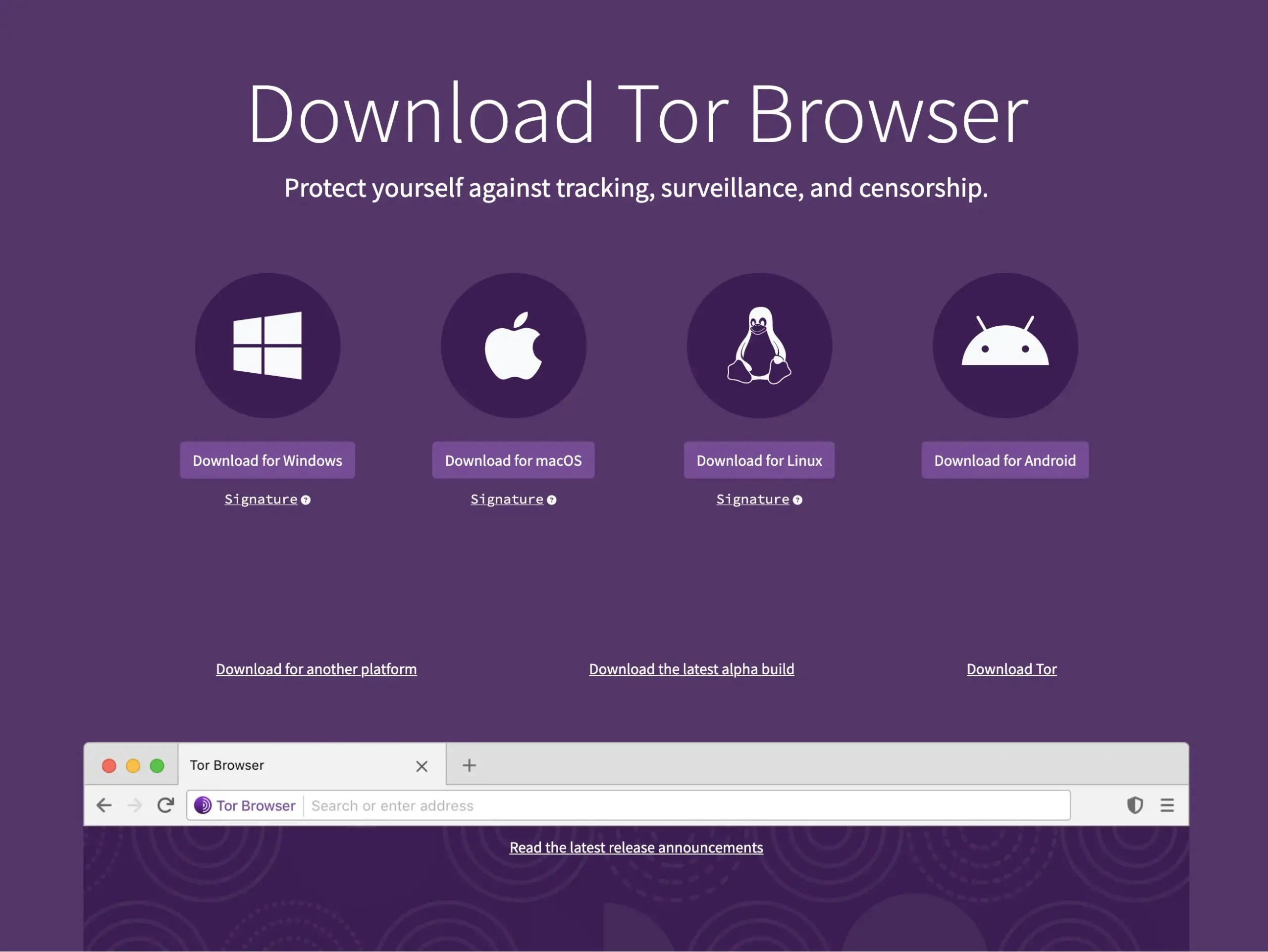
- Visit the official Tor Project website (torproject.org).
- Select the download for your operating system (Windows, macOS, or Linux).
- After downloading, open the installation file and follow the easy prompts to complete the setup.
Step 2: Launch and Configure Tor Browser
- Open the Tor Browser application.
- Click Connect on the welcome screen. Tor will automatically establish a secure connection to its network—this may take a few seconds.
- Once connected, you’ll see the default Tor Browser homepage, confirming you are now browsing anonymously.
Step 3: Strengthen Your Security and Anonymity
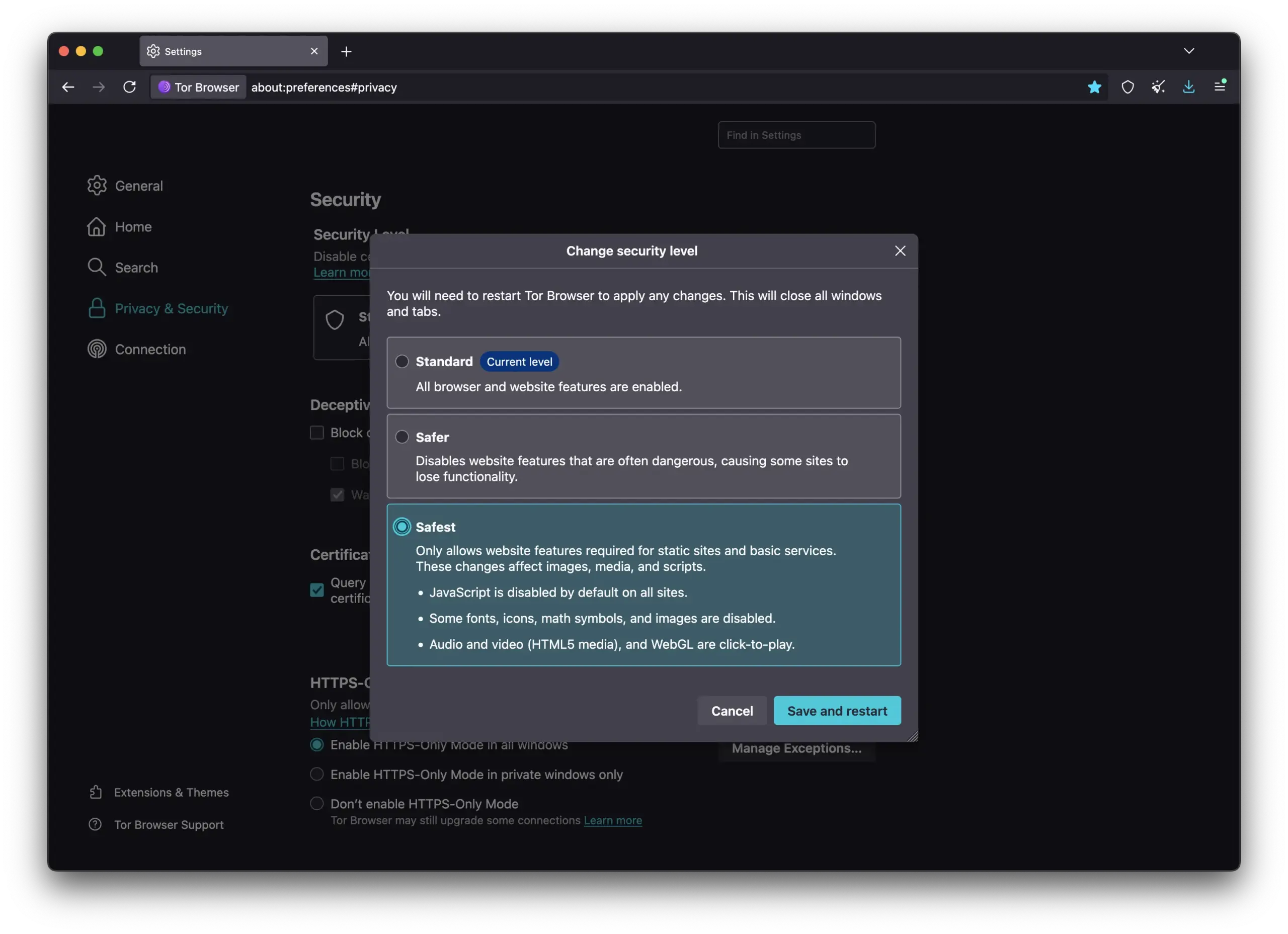
- Never resize the Tor Browser window, as this could compromise your anonymity.
- Use the shield icon next to the address bar to adjust your security level. For maximum safety, select “Safest” when exploring unknown websites.
- Avoid downloading files or logging into personal accounts while using Tor—these activities could potentially reveal your identity.
- Regularly update the Tor Browser whenever prompted to maintain optimal security.
Step 4: Using Popular Dark Web Search Engines
Now you’re ready to explore .onion sites safely. Here’s how to access trusted dark web search engines directly:
- DuckDuckGo .onion (Privacy-focused, familiar interface):
- URL:
http://duckduckgogg42xjoc72x3sjasowoarfbgcmvfimaftt6twagswzczad.onion - Ideal for general searches and accessing mainstream sites anonymously.
- URL:
- Ahmia (Safe and beginner-friendly):
- URL:
http://juhanurmihxlp77nkq76byazcldy2hlmovfu2epvl5ankdibsot4csyd.onion - Simply enter your query and browse through filtered, secure results.
- URL:
- Torch (Extensive indexing but proceed cautiously):
- URL:
http://xmh57jrknzkhv6y3ls3ubitzfqnkrwxhopf5aygthi7d6rplyvk3noyd.onion - Enter specific search terms carefully; always verify the legitimacy of sites before clicking.
- URL:
- Not Evil (Simple, effective, Google-like):
- URL:
http://notevilmtxf25uw7tskqxj6njlpebyrmlrerfv5hc4tuq7c7hilbyiqd.onion - Use precise keywords or advanced search options for clearer results.
- URL:
- Haystak (Large index, advanced options):
- URL:
http://haystak5njsmn2hqkewecpaxetahtwhsbsa64jom2k22z5afxhnpxfid.onion - Use for deep searches when mainstream engines return no results. Proceed cautiously — content filtering is minimal.
- URL:
- Candle (Lightweight, minimalist):
- URL:
http://ccandle5cxualc3xjakzb5wwz7cgj7xhzxiyflnkq6jkbj5bfcyj2mid.onion - Best for quick, simple queries. Expect limited coverage on niche topics.
- URL:
- VormWeb (Categorized results):
- URL:
http://vormwebsqfhfhfwkq7a53bkzf5ynw6xemrlp2mhdmkdxhxmhqbm7oyd.onion - Use specifically to check whether an address is legitimate or a phishing clone.
- URL:
- SearXNG (Open-source metasearch):
- URL: Varies by instance — find active instances at
searx.spaceor via Ahmia - Best for aggregated results from multiple indexes simultaneously.
- URL: Varies by instance — find active instances at
- MetaGer (Nonprofit, accountable operator):
- URL:
http://metagerv65pwclop7rn2aofbe7wsre5frmodul7gqbiasiobuimportant.onion - Use for anonymous surface-web research, not for finding .onion content.
- URL:
- Startpage (Google-quality results, anonymized):
- URL:
http://startpageewkhkej.onion - Use for high-quality surface-web results inside Tor. Not suitable for .onion discovery.
- URL:
- Excavator (Tor-only, no-log):
- URL:
http://2fd6cemt4gmccflhm6imvdfvli3nf7zn6rfrwpsy7uhxrgbypvwf5fad.onion - Use as a secondary .onion-only engine when other searches fall short.
- URL:
- Ecosia and Brave Search — no official .onion addresses. Access via regular URL through Tor Browser for anonymous surface-web browsing only.
Step 5: Verify and Navigate Results Safely
- Before clicking links, ensure sites are reputable by checking community feedback or trusted dark web directories.
- If uncertain about a site’s reliability, err on the side of caution and avoid interacting with it.
By carefully following these instructions and maintaining responsible browsing practices, safely exploring the dark web can be straightforward and secure. With these precautions in place, you’re ready to start your journey into the world of .onion sites.
How to Construct Effective Search Queries and Safely Navigate the Dark Web
Effectively finding content on the dark web requires slightly different search strategies compared to standard search engines. Here’s practical advice for building targeted search queries and safely navigating .onion websites.
1. Use Specific, Clear Keywords
- Unlike mainstream search engines, dark web search tools often rely on simpler algorithms.
- Instead of general queries like “books,” use highly specific searches like “free ebooks Tor library,” or “secure messaging forums Tor.”
- Combining keywords (e.g., “privacy email Tor”) yields more precise results.
2. Experiment with Synonyms and Alternative Terms
- Dark web resources often use different terminology compared to the surface web.
- If your initial search yields limited results, try alternative terms. For example, use “secure chat rooms” instead of just “messaging.”
3. Navigating Results Safely
- Check the URLs carefully before clicking—legitimate sites often have recognizable patterns or are cited by trusted sources.
- Always verify websites using known, reputable dark web directories or communities, such as Reddit’s r/onions.
- If a site lacks community reviews or clear references, proceed cautiously or avoid it entirely.
4. Evaluate Reliability Before Interacting
- Legitimate .onion sites usually have clear purposes and well-organized content.
- Avoid websites with excessive pop-ups, vague descriptions, or those requiring personal information without clear security assurances.
- If uncertain, seek feedback about the site from reputable forums or dark web community sources first.
5. Troubleshooting Common Search Problems
- If a site fails to load, try refreshing several times or check the URL carefully—.onion addresses often change or go offline temporarily.
- Using multiple search engines (Ahmia, Torch, Not Evil, DuckDuckGo) simultaneously can greatly increase your chances of finding functional sites.
- If results repeatedly lead nowhere, adjust your search keywords or phrases.
Adopting these good search habits—precise queries, careful verification, and cautious navigation—significantly improves your experience on the dark web, helping you safely find exactly what you’re looking for.
Understanding Risks and Staying Safe on the Dark Web
While exploring the dark web can offer valuable privacy benefits, it’s crucial to understand common risks and how to manage them effectively. Here’s what you need to know to navigate securely.
Common Risks of Exploring the Dark Web:
- Phishing attacks: Fake websites designed to steal sensitive personal or financial information.
- Scams and Fraud: Offers or marketplaces that seem too good to be true often are traps.
- Malware: Downloading files from unverified sources may infect your device with malicious software.
- Surveillance and Tracking: Mistakes like logging into personal accounts or resizing your Tor browser window can expose your identity.
Practical Guidelines to Manage Risks:
- Never Share Personal Information: Avoid entering personal details (like email addresses, passwords, or payment information) on unfamiliar or unverified sites.
- Avoid Downloads on Tor: Do not download files, especially documents or executables, unless you absolutely trust the source.
- Use Strong, Unique Passwords: If you must create an account on a .onion site, use a secure password unique to that site, not used elsewhere.
- Be Wary of Suspicious Links: Carefully examine all URLs and cross-check them against trusted dark web forums or directories.
- Stay Updated: Always use the latest version of the Tor Browser, and keep your security settings appropriately high.
Behaviors to Explicitly Avoid:
- Never Log Into Personal Accounts on Tor: Accessing email, banking, or social media accounts via Tor can compromise your anonymity.
- Don’t Trust Unverified Offers: Offers of free products, premium services at low costs, or guaranteed anonymity are typically red flags.
- Avoid Engaging with Illegal Content: Steer clear of sites offering illegal or exploitative materials—these pose serious ethical and legal risks.
Always approach the dark web with vigilance and caution. By staying alert, verifying sources carefully, and consistently practicing good security habits, you significantly reduce the risk of encountering threats or compromising your security.
Navigating the Dark Web Safely and Responsibly
Exploring the dark web can provide valuable insights and essential privacy, but it requires careful, informed navigation. By selecting trusted search engines, crafting precise search queries, and diligently verifying sites, you can greatly enhance your safety and effectiveness. Remember, good digital habits—such as maintaining anonymity, avoiding risky behavior, and staying vigilant—form the foundation of secure dark web exploration.
As you continue your online journey, keep expanding your knowledge of digital privacy and security. The more you understand, the better equipped you’ll be to navigate safely and confidently, no matter where your curiosity leads you.