Last Updated on June 20, 2026 by DarkNet
Qubes OS remains a strong choice for compartmentalized research and high-risk browsing in 2026. Here is a clear, lawful look at what it helps with and where it falls short.
What “Darknet Work” Means in 2026 (and Why Threat Modeling Comes First)
Legal vs. illegal activity: defining safe, legitimate use cases
In this context, darknet work means lawful activities that involve higher exposure to scams, malware, and intrusive tracking. Examples include:
- Investigating fraud and phishing schemes for research or journalism.
- Monitoring security trends, malware samples, and threat actor tactics for defensive purposes.
- Accessing censored information in repressive environments while following the law.
- Protecting personal privacy when browsing risky sites or discussing sensitive topics legally.
Illicit trade, evasion of law enforcement, or hacking are out of scope and illegal. Do not use any technology for wrongdoing.
Adversaries in 2026: malware, phishing, scams, and device compromise
Desktop threats in 2026 lean heavily on social engineering paired with commodity malware. Common risks include:
- Drive-by exploits in browsers and document viewers.
- Phishing that leads to account takeover or credential theft.
- Malicious files that call external helpers or abuse macros.
- Stealers that exfiltrate browser cookies and tokens.
- Firmware-level persistence and bootkits on poorly maintained hardware.
What Qubes can and cannot protect against
Qubes OS focuses on mitigations for compromise of individual applications and workflows by isolating them in separate qubes. It reduces the blast radius when something goes wrong. It does not make you anonymous and it does not erase human error.
Defends against:
- Application compromise that would otherwise take over the whole desktop.
- Persistence within a single disposable session after shutdown.
- Accidental cross-contamination if you keep strict separation between qubes.
- Some USB and networking risks via dedicated qubes.
Does not defend against:
- Correlation across identities if you reuse accounts, content, or timing.
- Global network adversaries that can link traffic patterns across exits.
- Firmware and hardware implants if your platform is already compromised.
- Social engineering and phishing that trick you into revealing secrets.
- Operator mistakes that copy data between the wrong qubes.
Learn more about the model in the official docs at Qubes OS documentation.
Qubes OS Security Model in Plain Terms: Xen, Qubes, dom0, and Disposable VMs
Compartmentalization vs. traditional endpoint security
Traditional desktops trust one kernel and rely on app sandboxes. Qubes places each task in its own virtual machine using the Xen hypervisor. Isolation is stronger than a browser sandbox because each qube has its own OS userspace and sometimes its own networking path.
Read about Xen at the Xen Project.
Why dom0 is special and why it should stay offline
dom0 is the privileged administrative domain that controls the GUI and VM management. It is not where you browse the web or open files. Keep dom0 offline, use it only to manage qubes, and update it via trusted mechanisms as described in the Qubes update docs.
Templates, AppVMs, and Disposables: the lifecycle of trust
- Templates provide the read-only root filesystem used by AppVMs and Disposable VMs.
- AppVMs persist user data across reboots but inherit software from a template.
- Disposable VMs start fresh each time and are discarded when closed, which limits persistence.
This lifecycle lets you contain damage and return to a known baseline quickly.
Pros: Where Qubes OS Offers Real Advantages for High-Risk Browsing and Research
Blast-radius reduction: containing a single compromised app
A malicious page or document that compromises a viewer qube is largely contained to that qube. Your password manager, personal files, and other sessions in different qubes are better protected if you keep boundaries strict.
Disposable sessions for risky links and unknown files
Disposable VMs make it safer to check suspicious links, open untrusted attachments, or preview unknown content because the environment resets on exit. This reduces persistence and follow-on exploitation.
Clear security boundaries that train better habits
Color-coded windows and named qubes reinforce context awareness. Over time, users build habits like never logging in to personal accounts from a research qube or never opening downloads in the same qube that handles identity work.
| Pros | Cons |
|---|---|
| Strong compartmentalization to limit damage from app compromise | High hardware requirements and reduced battery life on laptops |
| Disposable VMs for safer handling of risky links and files | Steep learning curve that can cause operator errors early on |
| Dedicated network and USB qubes to contain device risks | Hardware compatibility and firmware pitfalls can degrade security |
| Visible boundaries that improve user discipline and OPSEC | Not a magic anonymity tool and not a defense against correlation |
| Template-based updates simplify returning to a clean baseline | Storage wear and overhead from multiple qubes and snapshots |
Cons: Usability, Hardware Limits, and the Human-Error Tax
Performance costs: RAM/CPU needs and storage wear
Multiple VMs mean heavier RAM and CPU usage. In 2026, a smooth experience often starts around 32 GB RAM for active multitasking, with NVMe storage to handle IOPS and snapshots. Expect more fan noise and reduced laptop battery life compared to a single-OS setup.
Learning curve: UI friction that leads to mistakes
Context switching among qubes can cause confusion. Early mistakes include copying to the wrong VM, opening files in the wrong context, or mislabeling qubes. Patience and deliberate labeling help reduce this risk.
Hardware compatibility pitfalls and firmware risk
Some GPUs, Wi-Fi chipsets, and modern sleep states are hit-or-miss. Firmware risk remains a concern: if your platform firmware or firmware in peripherals is compromised, isolation loses value. Favor hardware with good virtualization support and timely firmware updates. Review hardware guidance in the Qubes requirements.
Tor Browser on Qubes in 2026: Strengths, Fingerprinting, and Common Misconceptions
What Tor actually does and doesn’t do for anonymity
Tor routes your traffic through relays to hide your IP from destinations and to separate identity from physical location. It does not stop endpoint compromise, prevent account correlation, or defeat a global passive adversary observing both entry and exit. See the Tor support and Tor Project pages for details.
Fingerprinting and extensions: why hardening can backfire
Tor Browser tries to standardize fingerprints. Extra add-ons or nonstandard tweaks often make your browser more unique, which harms anonymity. In 2026, cross-context fingerprinting via canvas, WebGL, and behavior timing remains potent. Stick to defaults unless official guidance says otherwise.
Handling downloads and external viewers safely
Opening downloads in isolated viewer qubes reduces damage if a file is malicious. Avoid reusing the same stateful qube for identity work and untrusted files. When in doubt, use a fresh Disposable VM for viewing and keep persistent qubes for data you intend to keep.
Network Isolation and Compartment Design: How to Separate Identities Without Self-Sabotage
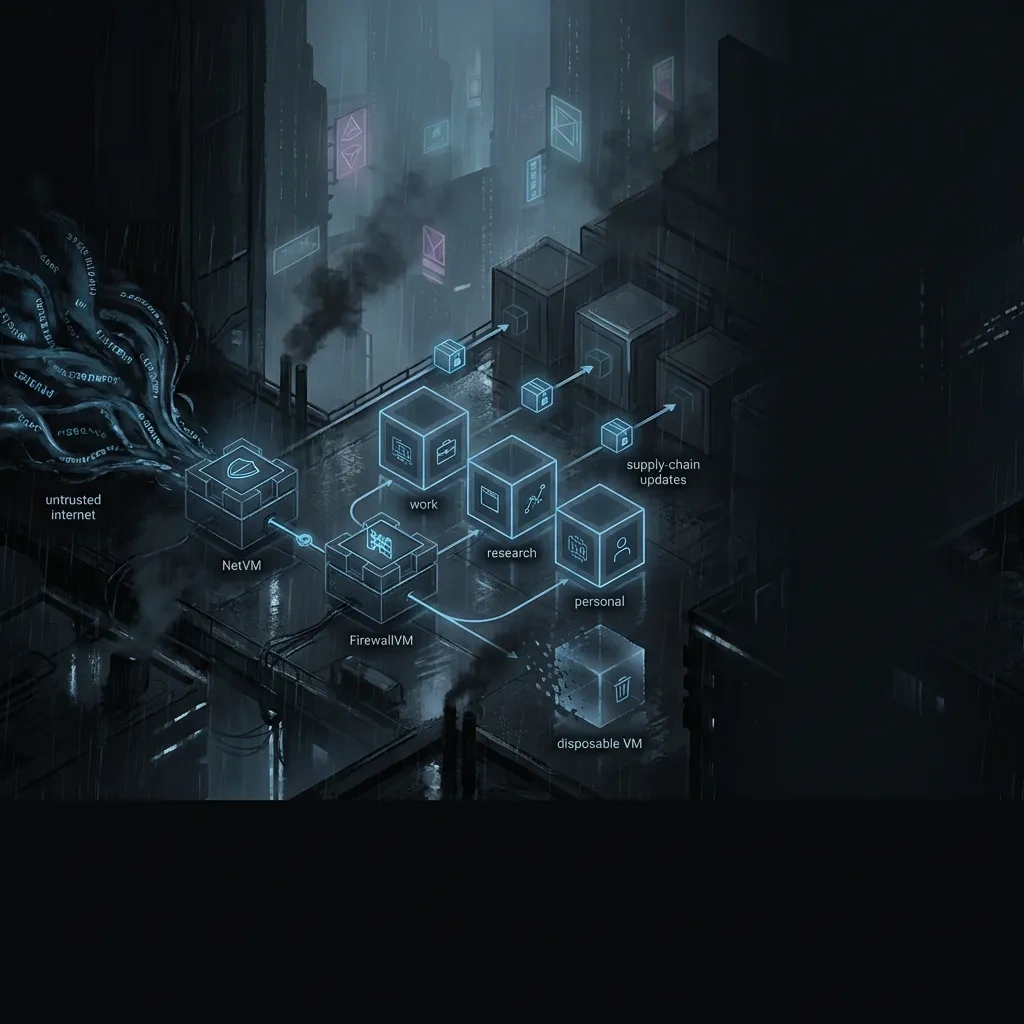
Networking qubes: NetVM, FirewallVM, and per-qube routing concepts
Qubes routes traffic from each AppVM through a chosen NetVM, often chained behind a FirewallVM. This lets you:
- Assign different network paths per qube.
- Apply basic policy filtering between qubes and the network.
- Separate high-risk browsing from other tasks at the network layer.
Review details at Qubes networking docs.
Identity separation patterns and common correlation traps
Keep distinct identities in separate qubes and do not cross-post, share files, or reuse credentials between them. Avoid shared stylometry, unique document metadata, or synchronized activity times. Even with separate network paths, content and timing can betray linkage.
DNS, time sync, and metadata leakage considerations
DNS, time, and system metadata can correlate activity. Prefer consistent, privacy-aware defaults rather than exotic customizations that stand out. Keep clocks accurate enough for security but avoid unusual time offsets that make you unique. For general guidance on threat modeling process, see NIST resources.
Data Handling in Qubes: Downloads, Copy/Paste, USB Devices, and Anti-Forensics Reality Check
Safe file transfer between qubes: minimizing cross-contamination
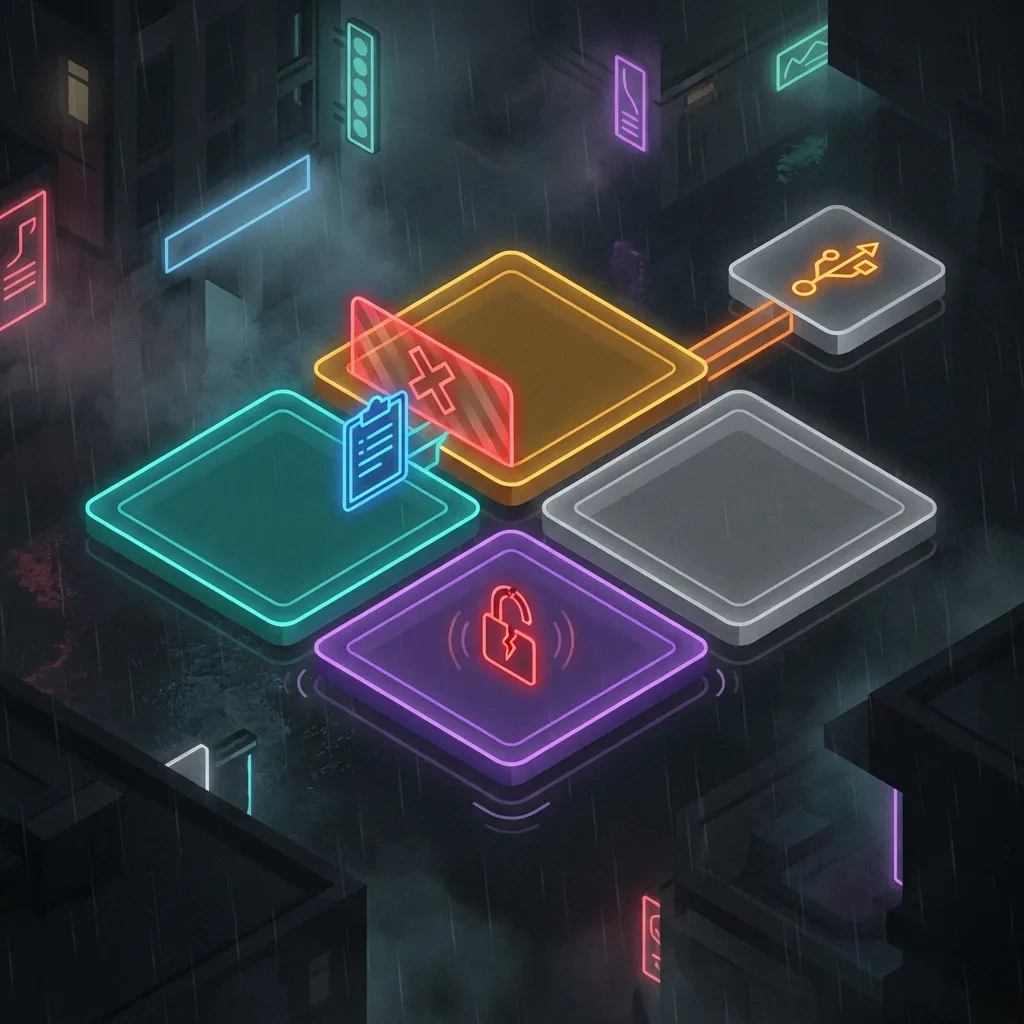
Qubes has built-in copy and move commands that avoid direct sharing. Transfer only what you need and sanitize files before moving to more trusted qubes. Keep strict rules for which direction data flows, and consider using a disposable middle step for untrusted sources.
USB and peripherals: why device isolation matters
USB devices can attack hosts. Use a dedicated USB qube and only attach devices where strictly needed. Be cautious with removable media and unknown peripherals. See USB security in Qubes.
Anti-forensics myths: what “amnesiac” does and doesn’t mean
Disposable VMs forget their state at shutdown, which reduces persistence. This is not a forensics shield. Host logs, firmware artifacts, swap remnants on misconfigured systems, and external network logs can still exist. Focus on reducing risk, not on erasing evidence.
Updates, Supply Chain, and Verification: Keeping Templates and AppsVMs Trustworthy
Template updates and why stale templates increase risk
Templates control the software versions used by many qubes. Stale templates mean stale vulnerabilities. Update templates promptly following the VM update guidance.
Repo trust, signatures, and avoiding sketchy third-party packages
Rely on signed repositories and avoid unknown third-party packages. Unofficial scripts that promise hardening can increase fingerprintability or break security guarantees. Prefer documented configurations from the official Qubes docs and vendor repositories.
Backups: separating confidentiality from recoverability
Backups protect against data loss, not against exposure. Encrypt backups and store them separately from the device. Keep identity-specific data sets in separate archives to avoid accidental mixing on restore. See backup and restore docs.
When Qubes Is the Wrong Tool: Scenarios Better Served by Other Approaches
If you need mobility, low resources, or simple workflows
If you travel constantly, need all-day battery, or have limited RAM and storage, a lighter setup may be safer in practice. Complex tools that you cannot operate reliably can increase risk.
If your main risk is account compromise rather than device compromise
If phishing and account takeover are your top risks, focus on strong authentication, hardware security keys, and account hygiene. Qubes helps contain malware but cannot fix weak passwords or reused tokens.
Safer alternatives for lawful privacy: hardened browsers, VMs, or live OS
Depending on needs, consider a well-maintained Linux or BSD with a separate VM for risky browsing, or a reputable live OS for single-purpose sessions. Keep configurations standard to reduce fingerprinting. Follow official documentation for any tool you choose.
Bottom Line: Who Should Use Qubes in 2026 and What “Secure Enough” Looks Like
Who benefits most: researchers, journalists, and high-risk privacy users
Qubes shines when you need strong separation between tasks, identities, or data sets and you accept the overhead. Security researchers, investigative journalists, and privacy-conscious users who routinely open untrusted content benefit most.
Decision checklist: requirements before you commit
- Hardware with virtualization support, ample RAM, and reliable storage.
- Willingness to learn qube boundaries and maintain templates.
- Clear policies for identity separation and data flow.
- Routine updates and backups with verification.
Practical expectations: reducing risk vs. achieving “perfect anonymity”
Qubes reduces risk when used consistently. It does not provide perfect anonymity or absolute protection against powerful adversaries. Measure success by fewer incidents and limited damage, not by the illusion of invincibility.
FAQ: Qubes OS and darknet research in 2026
1) Is Qubes OS actually safer than a standard Linux distro for high-risk browsing?
Often yes, because it isolates risky activities into separate qubes. A single exploit is less likely to take over the entire system. That said, safety still depends on your behavior and updates. See the Qubes docs for the design rationale.
2) Does using Tor in Qubes OS make you anonymous by default?
No. Tor hides your IP from destinations, but correlation, fingerprinting, and endpoint compromise can still identify you. Avoid mixing identities, and keep Tor Browser defaults per official Tor guidance.
3) What are the biggest mistakes that de-anonymize people even with compartmentalization?
Reusing accounts across qubes, cross-posting unique content, leaking document metadata, installing nonstandard browser add-ons, copying files to the wrong qube, and keeping stale templates are common pitfalls.
4) How demanding is Qubes OS hardware-wise in 2026?
For comfortable multitasking, plan on a modern CPU with virtualization features, 32 GB RAM, and fast NVMe storage. Laptops may see reduced battery life. Check system requirements.
5) Are Disposable VMs enough to protect against malicious downloads?
They help by limiting persistence, but they are not a cure-all. Malicious files can still harm you if you choose to keep or move them. Use disposables for viewing, and keep trusted data in separate qubes.
6) How should I think about firmware and hardware-level threats when using Qubes?
If your firmware is compromised, isolation can be bypassed. Keep firmware updated, prefer well-supported hardware, and assume that firmware-level adversaries are out of scope for most users. Review platform security guidance from your vendor and the Qubes docs.
7) What are good lawful use cases for Qubes OS in 2026?
Malware analysis in isolated qubes, investigative research on risky sites, secure note-taking and credential management separate from browsing, and separating work identities from personal activities.
8) When should I choose a simpler setup instead of Qubes?
If your main risks are phishing and weak authentication, or if your hardware is limited, a simpler OS with strong browser hygiene, password management, hardware keys, and a single dedicated VM for risky browsing may be more practical and safer in practice.
Key takeaways
- Qubes OS in 2026 is strong for containing app-level compromise and separating identities, not for guaranteeing anonymity.
- Dom0 must stay offline and templates must be updated to keep risk low.
- Default Tor Browser settings are safer than ad hoc hardening that increases fingerprintability.
- Operator discipline matters more than any single feature. Boundaries fail if you cross-contaminate qubes.
- If Qubes is too heavy for your workflow, simpler lawful alternatives can deliver better real-world safety.