




Last Updated on June 19, 2026 by DarkNet
A practical 2026 guide to modern 2FA, passkeys, and hardware security keys. Focused on phishing resistance, recovery, and lockout risks for high‑risk users.
Why 2FA still matters in 2026
Passwords alone are fragile. Breaches, password reuse, and fast phishing kits make account takeovers common. Two factor authentication, also called multi factor authentication when more than two factors are involved, adds an independent check that attackers must defeat to gain access. In 2026, strong 2FA and security keys do more than block basic password theft. They reduce phishing success, limit credential stuffing, and help contain damage from data leaks.
For high risk users and teams, the stakes include identity theft, account extortion, and exposure of sensitive contacts. Strong 2FA is not a guarantee of safety. It is a practical barrier that often turns a catastrophic compromise into a blocked attempt or a contained incident. If a service offers hardware backed FIDO2 or passkeys, enabling it is one of the most effective defensive steps you can take.
Key terms and standards
What 2FA and MFA mean
2FA is two factor authentication. It typically combines something you know, like a password, with something you have, like a code or a security key. MFA is multi factor authentication and may involve two or more factors. Factors include knowledge, possession, and inherent traits like biometrics. The goal is independence. A breach of one factor should not compromise the others.
TOTP time based codes
TOTP stands for Time Based One Time Password. Authenticator apps generate 6 to 8 digit codes that refresh every 30 seconds using a shared secret and time. You scan a QR code or enter a secret to register the app. TOTP works offline and across many services, but secrets can be copied. If an attacker gets the secret or tricks you into entering a code on a fake site, they can bypass it.
FIDO2 and WebAuthn
FIDO2 is a set of open standards from the FIDO Alliance for phishing resistant authentication. WebAuthn is the W3C web API that lets browsers and apps perform FIDO2 authentication with security keys and platform authenticators. Instead of shared secrets, FIDO2 uses asymmetric cryptography per site. The browser proves the website origin and the key signs a challenge that only the real site can validate. Learn more from the FIDO Alliance and the W3C WebAuthn spec.
Passkeys
Passkeys are FIDO2 credentials packaged for user friendly sign in, often synced within an ecosystem like Apple, Google, or Microsoft. A passkey can be stored on a hardware key or in a platform authenticator like your phone or laptop. On many devices, passkeys unlock with a local PIN or biometric. They reduce phishing risk because they are bound to the website origin. See platform guidance from Apple, Google, and Microsoft.
Push prompts and number matching
Push based MFA sends a prompt to a registered device to approve a login. Modern implementations add number matching or geolocation details. This improves security, but push fatigue and slick social engineering campaigns still lead to mistaken approvals.
SMS and email codes
SMS and email codes are easy to deploy and better than nothing. They are also the least resilient against SIM swaps, mailbox compromise, and real time phishing. They can still be useful as a limited emergency fallback, but high value accounts should prefer phishing resistant options.
Threat model for high risk accounts
Phishing and relay
Phishing kits increasingly relay real time login flows and can capture passwords and TOTP codes. Some tools proxy WebAuthn flows too, though phishing resistant designs make this harder. Binding authentication to the website origin, plus careful verification of domains and URLs, helps. Passkeys and security keys make phishing more difficult because the browser confirms the origin before the key releases a signature.
Malware and session theft
Malware on a device can read keystrokes, scrape screenshots, and steal browser cookies or tokens after authentication. Even strong MFA cannot protect a session that is already established on a compromised device. Device hygiene, timely updates, limited extensions, and separate user profiles can reduce this risk.
SIM swaps and voice mail
Attackers may socially engineer carriers to move a phone number to a new SIM, intercepting SMS codes and calls. Avoid using SMS as a primary factor. Remove phone numbers from recovery where possible or restrict them to low privilege notifications.
Recovery abuse and account resets
Attackers often target recovery channels. Weak or poorly monitored recovery options can undo strong 2FA. Audit backup email addresses, phone numbers, and trusted devices. Prefer revocable backup codes and secondary security keys over less controlled channels.
Seizure, loss, and availability
Travel, device loss, or confiscation can leave you without access to security keys or passkeys. Plan for availability with backups, but balance recovery convenience against privacy and data exposure. Never rely on a single device or a single channel.
Comparing MFA methods in 2026
TOTP apps
Strengths include offline operation, broad compatibility, and no phone number. Weaknesses include phishing susceptibility and the risk that the seed is backed up insecurely or synced without encryption. Use app level PIN or biometric and secure backups if you choose to sync.
Push approvals
Modern push with number matching reduces blind approvals, and device risk signals can help. Still, push fatigue and social tactics remain effective. Lock down approvals with biometrics and review device enrollment logs when available.
SMS and email
Use as a last resort. They are convenient but vulnerable to SIM swap, mailbox compromise, and phishing. If a service forces SMS or email, set alerts for account changes and limit privileges on that account.
Passkeys and platform authenticators
Great usability and strong phishing resistance. Main considerations are ecosystem trust, cross platform portability, and how recovery works. Understand whether your passkeys sync to cloud and whether you can export or move them if needed.
Hardware security keys
External keys that speak FIDO2 offer strong phishing resistance with minimal metadata about you. They work across platforms, can require a local PIN or biometric, and do not sync by default. You must manage backups and carry them when needed.
Hardware security keys in 2026
Key types and interfaces
Security keys come with USB A or C, NFC, and sometimes Lightning. Choose form factors that fit your devices. Many keys are multi protocol, supporting FIDO2, WebAuthn, and legacy OTP. Focus on FIDO2 and WebAuthn for phishing resistant login, and use legacy OTP only if you must support older systems.
Phishing resistance and origin binding
During WebAuthn, the browser validates the domain and sends a signed challenge from the key. A fake site cannot replay this signature to the real site because the signature is scoped to the origin. This design blocks most credential phishing.
PIN, biometrics, and resident credentials
User verification adds a local check, like a PIN or biometric, so a stolen key cannot be used alone. Many services also support resident credentials, sometimes called discoverable credentials, so the key can store site credentials and you can select an account on the key during login. Use a PIN on your keys and limit resident credentials on keys that may be handled by others.
Where keys do not help
Keys do not fix device compromise, malicious browser extensions, or token theft after login. They also do not override weak recovery settings. If an attacker can reset your second factor via email or a help desk, they can bypass the strength of the key. Use strong recovery controls and monitor account change alerts.
Privacy and attestation
Some keys can present attestation data that identifies the manufacturer and model. Many services do not require attestation. When privacy matters, prefer options that do not record unique device identifiers and avoid linking keys across unrelated identities.
Cost and supply considerations
Quality keys cost money, and you need backups. Budget for at least two keys per person. Replace keys from reputable vendors when they reach end of support to ensure firmware updates and ongoing compatibility.
Backup and recovery planning
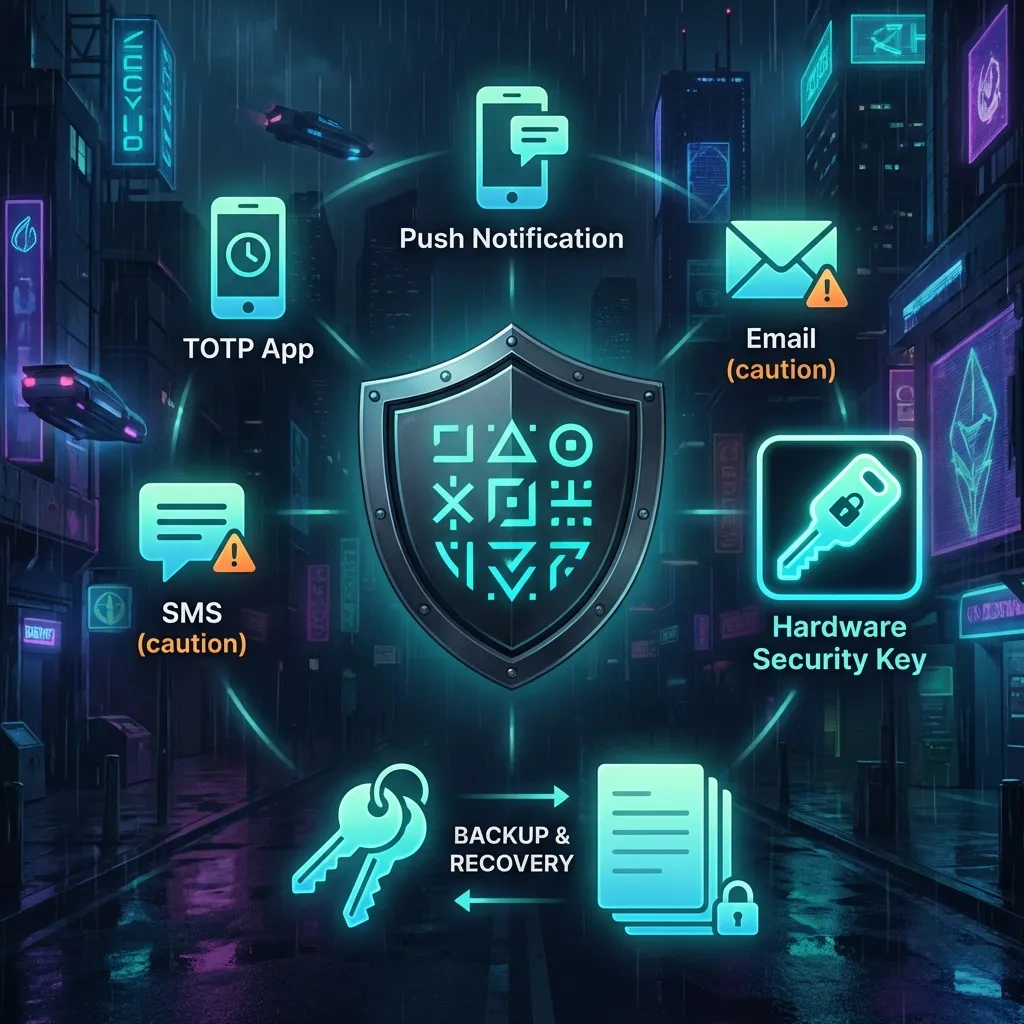
Recovery is where strong setups often fail. Plan for account continuity without opening easy side doors for attackers.
Use at least two hardware keys
Register two or more keys for each high value account. Store them separately. Keep one with you for daily use and one in a secure place you can access within days, not months. For teams, maintain a sealed break glass key held by a second trusted person with documented access procedures.
Backup codes and how to store them
If a service offers single use backup codes, generate them and store them offline. A printed copy in a sealed envelope or a secure password manager entry is better than a screenshot in your photo roll. Rotate codes after any suspected exposure.
Recovery settings to avoid or restrict
Disable or tightly control recovery via phone calls, SMS, and unverified email addresses. Remove old devices and unknown sessions. If a service allows recovery via support tickets, add extra verification like security questions that are not guessable and are unique per service. Better yet, prefer services that support multiple hardware keys and robust admin policies.
Test your recovery plan
Do a dry run. Sign out on a secondary device and confirm you can sign back in using your backup key or codes. Verify you can revoke a lost device quickly. Schedule these tests a few times per year and update documentation.
Travel and availability considerations
Plan for access during travel or emergencies. Carry your daily key discreetly and consider using a low profile form factor. Keep a backup key in a separate location. Do not rely on a single backpack, phone, or laptop. Balance availability with privacy.
Operational pitfalls and lockouts
Single device dependence
Relying on one phone or one key is a common failure. If it is lost, damaged, or unavailable, you are locked out. Always register at least two second factors per account.
Weakest link recovery
Strong 2FA cannot save you if the recovery path is weak. An attacker will target email inboxes, linked phone numbers, help desks, and OAuth connections. Harden these paths or remove them.
Session hijacking
Once authenticated, many services issue tokens that avoid re prompts. Malware or malicious extensions can steal these tokens. Periodically force sign outs from all devices, enable re authentication for high risk actions, and keep OS and browsers patched.
Seizure or confiscation risks
In some scenarios, devices or keys can be taken. Use local PIN or biometric on keys, keep a separate backup in a different location, and avoid storing extra credentials on devices you do not control. Make sure you can revoke lost keys quickly.
Pros and cons matrix
| Method | Pros | Cons | Best use |
|---|---|---|---|
| SMS codes | Ubiquitous, easy to enroll | SIM swap risk, phishing friendly, mailbox exposure if forwarded | Last resort fallback when no other option exists |
| Email codes | Simple, no phone number | Depends on email account security, phishing friendly | Low privilege accounts or temporary fallback |
| TOTP app | Offline, widely supported, no phone number | Phishable, seed can be copied or synced insecurely | General purpose MFA when FIDO2 is unavailable |
| Push approval | Fast, user friendly, can include device signals | Push fatigue, social engineering risk | Work accounts with strong admin policies |
| Passkeys on device | Phishing resistant, easy sign in, biometric unlock | Ecosystem dependence, recovery varies by platform | Personal accounts across modern devices |
| Hardware security keys | Strong phishing resistance, cross platform, minimal metadata | Must carry and manage backups, purchase cost | High value accounts, admin roles, privacy sensitive use |
Recommended configurations for individuals and teams
For individual high value accounts
- Enable FIDO2 or passkeys wherever available. Register two hardware keys per account.
- Keep one daily key with a PIN and one backup key stored separately.
- Generate backup codes and store them offline. Remove phone numbers from recovery when possible.
- Prefer platform passkeys for convenience on low risk accounts. Use hardware keys for sensitive identities.
For small teams and shared access
- Use individual accounts with role based access. Avoid shared passwords.
- Require FIDO2 for admins. Issue two keys per person and a sealed break glass key under dual control.
- Document device enrollment, recovery steps, and revocation procedures. Review access quarterly.
- Use conditional access policies and require re authentication for sensitive actions.
For remote or travel scenarios
- Carry a low profile daily key and keep a second key in a separate, safe location.
- Avoid relying on a single device. Prepare alternate sign in on a secondary device.
- Keep emergency contact and revocation instructions accessible but secure.
Device hygiene and monitoring
- Keep OS, browsers, and security patches current. Limit extensions.
- Use separate browser profiles for different identities and reduce token exposure.
- Enable account change alerts and review sign in logs where available.
Choosing vendors and ecosystems
Compatibility and open standards
Favor providers that implement FIDO2 and WebAuthn consistently across platforms. Open standards reduce lock in and improve auditability. Confirm that your priority services support multiple hardware keys and passkeys.
Security policies and audits
Look for published security whitepapers, bug bounty programs, and clear incident response. For identity providers, review tenant wide MFA policies, device management, and token lifetime controls. NIST guidance in SP 800 63B provides useful benchmarks.
Recovery and migration
Understand how to move credentials between devices and what happens if you lose access. Ensure you can add and revoke keys without waiting on support. If you rely on synced passkeys, confirm export options and cross platform sign in support.
Privacy and data handling
Prefer vendors that minimize data collection around authentication. Avoid linking phone numbers or personal emails to accounts that do not need them. If attestation is optional, consider disabling it for privacy.
FAQ
Are hardware security keys better than authenticator apps in 2026?
For phishing resistance, yes. FIDO2 security keys and passkeys bind authentication to the site origin, which blocks most phishing and relay attacks that defeat TOTP codes. Authenticator apps remain useful where FIDO2 is unsupported. A strong setup often combines hardware keys for high value accounts and TOTP for legacy services.
What is the safest fallback if I lose my primary security key?
A second registered hardware key stored separately is the safest practical fallback. Single use backup codes kept offline are next best. Avoid relying on SMS or phone calls for recovery unless there is no alternative, and remove phone numbers from recovery where possible.
Do passkeys replace 2FA or complement it?
Passkeys can replace passwords entirely and act as a primary factor. In many consumer contexts, a passkey plus device unlock provides strong security with good usability. Some enterprise setups still layer passkeys with additional policy checks. When available, passkeys are a strong choice for most accounts.
How do I reduce phishing risk when a site only offers SMS or email codes?
- Bookmark the real login page and use the bookmark, not links in messages.
- Enable account change alerts and review sign in history.
- Harden your email account with FIDO2 or passkeys since it becomes the root of recovery.
- Ask the provider to support FIDO2, and reassess the account’s privileges until they do.
How many security keys should I register for a high value account?
At least two per person. Use one daily and keep one backup stored separately. For critical roles, consider a third break glass key under dual control with documented access and periodic testing.
What recovery settings most commonly undermine strong 2FA?
Phone based recovery, weak backup emails, overly permissive help desk resets, and unmonitored trusted devices. Remove or restrict these, prefer multiple hardware keys and offline backup codes, and enable alerts for recovery events.
Can malware still compromise accounts protected by security keys?
Yes. Security keys stop many phishing attacks, but malware can steal tokens after you authenticate, capture keystrokes, or exfiltrate data. Keep devices updated, reduce extensions, use separate profiles, and sign out of sessions you do not need.
Final checklist
- Enable FIDO2 or passkeys on every service that supports them.
- Register two hardware keys per high value account and set a PIN on each.
- Generate and securely store offline backup codes. Test them.
- Remove phone numbers and weak emails from recovery. Monitor account change alerts.
- Keep OS and browsers updated. Limit extensions and separate profiles by role.
- Document how to revoke and replace keys. Rehearse a recovery drill twice a year.
- Review vendor policies, logs, and device enrollments quarterly.
Key takeaways
- Hardware backed FIDO2 and passkeys provide strong phishing resistance in 2026.
- Recovery is the weakest link. Use a second key and offline codes, not phone based resets.
- Device compromise can still defeat sessions. Maintain strict device hygiene.
- Plan for availability. Avoid single device dependence and test your recovery path.
- Prefer open standards and vendors with clear security and privacy policies.








