




Last Updated on June 19, 2026 by DarkNet
Whonix routes all workstation traffic through a dedicated Tor gateway VM. This article breaks down the security model, real pros and cons, and how Whonix compares to Tails and Qubes for lawful privacy work.
What Whonix Is and How Its Two-VM Design Works
Gateway VM vs Workstation VM: Separation of duties
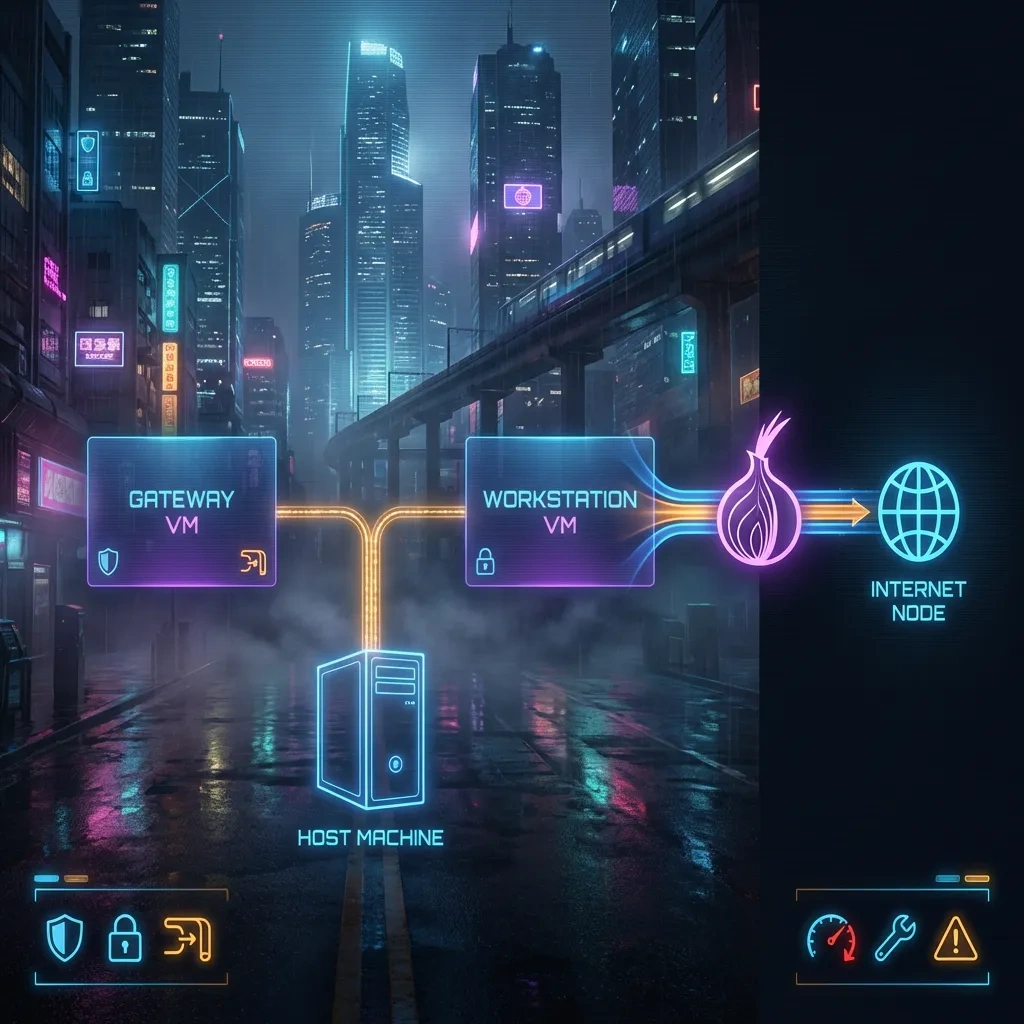
Whonix is a two-VM operating system approach that splits networking and application activity into separate virtual machines. The Whonix-Gateway VM runs Tor and handles all network routing. The Whonix-Workstation VM runs user applications, like Tor Browser, and has no direct hardware network access. This split is the core of Whonix’s defense. If an application in the workstation tries to connect without Tor, it fails, because only the gateway is allowed to talk to the network. See the official Whonix documentation for design details.
How traffic is forced through Tor by design
Network access from the workstation is forced through a virtual network interface that connects only to the gateway. The gateway enforces Tor as the only egress. This default routing, alongside firewall rules and limited interfaces, minimizes accidental IP leaks from applications. Tor’s design is explained by the Tor Project support pages, and Whonix integrates Tor as the mandatory path to the internet.
What you still trust: host OS, hypervisor, and hardware
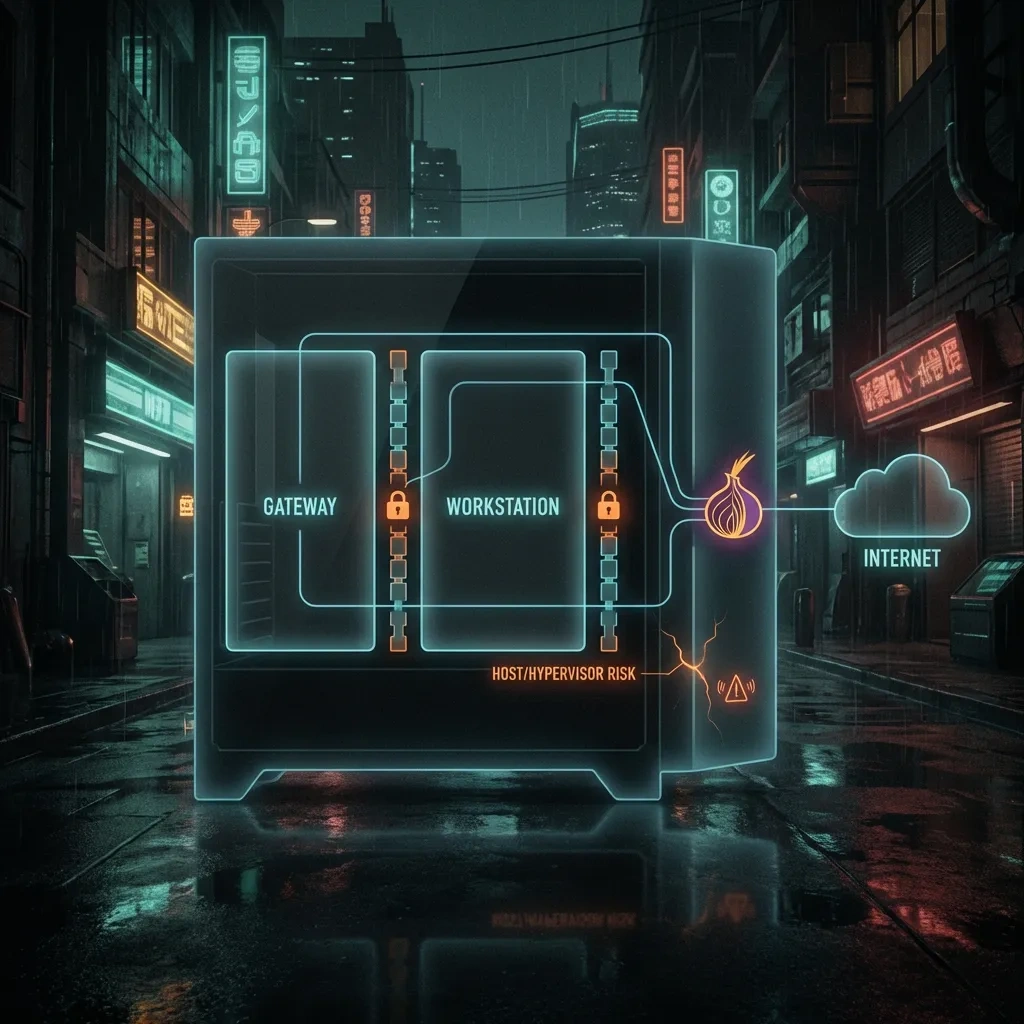
Whonix hardens the path from apps to Tor, but you still trust the host operating system, the hypervisor, and the hardware. If the host is compromised, or the hypervisor is vulnerable, the attacker can access the workstation in ways Whonix cannot prevent. Whonix’s own threat model explicitly acknowledges these dependencies in its Warnings and security notes.
Threat Model: What Whonix Protects Against (and What It Doesn’t)
Mitigations against IP leaks and app-level misrouting
Whonix reduces common mistakes that leak your IP address. For example, misconfigured apps or plugins that try to connect directly simply do not have a route. DNS requests are also forced through Tor. This helps with Whonix for darknet browsing in lawful research contexts, because the workstation cannot bypass the gateway by accident. Tor Browser remains the default front end for web traffic, which the Tor Browser Manual documents extensively.
Limits against malware, exploits, and targeted deanonymization
Whonix is not a silver bullet against malware or targeted attacks. If Tor Browser is exploited, an attacker might run code within the workstation. The gateway still enforces Tor, but deanonymization can occur through correlation attacks, cross-site tracking, or user behavior. Advanced adversaries can combine timing, identity reuse, or injected assets to link activity. Whonix reduces IP-level leaks but cannot remove the risks of content exploits or sophisticated traffic analysis described in Tor’s threat discussions on the Tor Project site.
Legal and behavioral risks that anonymity tools cannot solve
Whonix does not make unlawful activity safe. It does not erase legal obligations, workplace rules, or platform policies. Behavior often deanonymizes users, such as logging into personal accounts, sharing unique data, or revealing patterns over time. Anonymity is contextual and probabilistic, not absolute. Use Whonix for ethical privacy, research, and journalism.
Core Pros: Network Isolation, Tor Enforcement, and Leak Resistance
Compartmentalization benefits compared to single-OS Tor setups
Running Tor Browser on a standard OS still leaves room for misrouting by other applications. Whonix’s two-VM architecture contains applications in the workstation and forces all traffic through the gateway. This compartmentalization makes it less likely that a background process or a misconfigured client will bypass Tor.
DNS and routing leak protections in practice
DNS queries inside the workstation cannot leave except via the gateway, which resolves them over Tor. Tools that inadvertently leak DNS on normal systems are blocked by design. Whonix documents these protections in its design overview.
Better containment of workstation misbehavior
If an application goes rogue within the workstation, the gateway still restricts its network path to Tor. This reduces IP-based deanonymization. It does not fix identity reuse or fingerprinting mistakes, but it narrows the blast radius for many common misconfigurations.
Pros summary
- Two-VM separation makes accidental IP leaks less likely compared to single-OS Tor setups.
- Mandatory Tor egress via the gateway helps enforce consistent routing and DNS over Tor.
- Clear operational boundary: workstation apps never see the real network interface.
- Works across popular hypervisors, with official guidance in the Whonix docs.
- Pairs well with stronger isolation platforms, such as Qubes OS, for high-end compartmentalization.
Core Cons: Performance Overhead, Usability Friction, and Misconfiguration Risk
Resource requirements and VM performance costs
Two VMs mean more CPU and RAM pressure. Tor adds latency by design. On older laptops or low-power hosts, the experience may feel slow. Heavy tasks like multimedia or compiling code inside the workstation will highlight this cost.
Learning curve: updates, VM management, and persistence
Users need to understand snapshots, template updates, and trust boundaries between host, gateway, and workstation. Persistence must be handled carefully to avoid mixing identities or leaking metadata. The Whonix documentation provides guidance, but there is a real learning curve.
Where users accidentally bypass protections
The most common bypass is outside Whonix: using the host OS for related tasks, sharing clipboards or folders unsafely, or adding custom network adapters to the workstation. Side channels, identity reuse, and downloading risky software can also undermine protections.
Cons summary
- Performance overhead from virtualization and Tor latency.
- Operational complexity and need for consistent updates.
- Trust remains in the host OS, hypervisor, and hardware.
- Misconfigurations on the host or hypervisor can nullify isolation.
- Does not prevent behavior-driven deanonymization or targeted attacks.
Whonix vs Tails vs Qubes: Which Fits Which Use Case
Tails: amnesic browsing and portability
Tails is a live system that routes traffic through Tor and forgets state at shutdown by default. It is portable and useful for one-off sessions on varied hardware. See the Tails documentation.
Qubes + Whonix: stronger compartmentalization with more complexity
Qubes OS uses multiple VMs to isolate tasks at the operating system level. Whonix templates inside Qubes provide strong isolation between identities and activities, at the cost of more hardware and operational complexity. See Qubes Whonix docs and the general Qubes OS documentation.
Typical scenarios: journalists, researchers, developers, privacy users
Whonix suits users who need persistent, VM-based workflows with Tor enforcement. Tails suits portable, amnesic sessions. Qubes plus Whonix suits high-assurance compartmentalization, such as separating multiple research identities, development environments, and sensitive analysis VMs.
| Factor | Whonix | Tails | Qubes + Whonix |
|---|---|---|---|
| Primary goal | Persistent VMs with Tor-enforced networking | Amnesic, portable Tor sessions | Strong multi-VM isolation with Tor-based qubes |
| Persistence | Persistent by default, user controlled | Amnesic by default, opt-in persistence | Template-based persistent qubes |
| Isolation model | Two-VM split: gateway and workstation | Single live OS with Tor routing | System-wide compartmentalization across many VMs |
| Ease of use | Moderate | Easy for one-off sessions | Advanced |
| Performance | VM overhead plus Tor latency | Live OS overhead plus Tor latency | High overhead due to many VMs and Tor |
| Update model | Update gateway and workstation VMs | Fresh media or in-session updates | Template updates for multiple qubes |
| Best for | Daily research and privacy tasks on a stable host | Travel, kiosks, borrowed machines | High-assurance multi-identity operations |
| Main risks | Host compromise, misconfiguration, user behavior | Hardware variability, persistence mistakes | Complexity, hardware demand, misconfigured inter-qube sharing |
Host OS and Hypervisor Risks: Where Whonix Can Still Fail
Host compromise and clipboard/shared-folder pitfalls
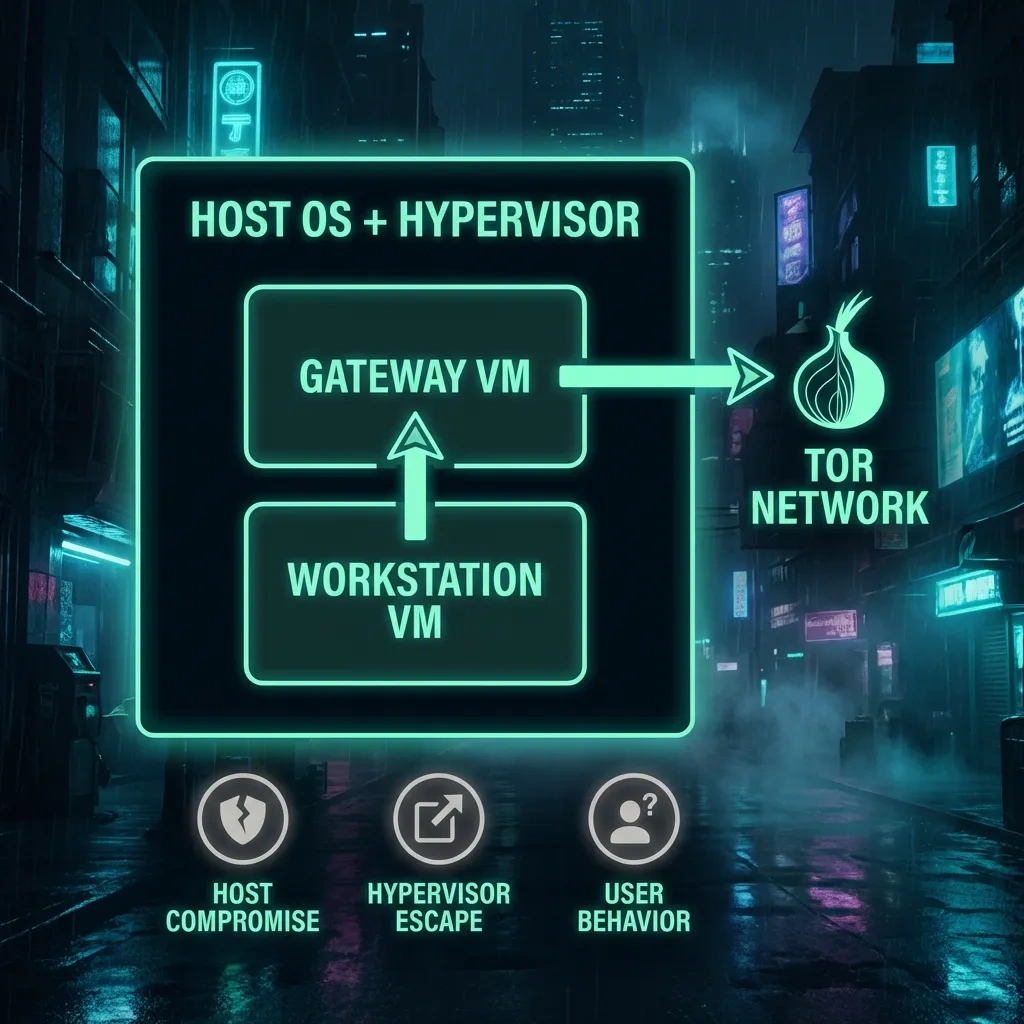
If the host OS is compromised, Whonix cannot save you. Full host control lets an attacker screen-capture, keylog, or inspect VM memory. Shared clipboards or folders can leak data across compartments. Disable unnecessary host-guest integrations for sensitive tasks. Whonix warns about these pitfalls in its warnings.
Hypervisor escape and supply-chain considerations
Hypervisor bugs and supply chain risks are rare but real. Keep your hypervisor updated and source Whonix images from official channels with signature verification. The Qubes documentation provides a model for defense in depth and strong update hygiene, see the Qubes docs for practices that also help non-Qubes users.
Hardware identifiers and side-channel realities
MAC addresses, device fingerprints, and timing leaks can correlate activity across sessions if you reuse the same hardware and network patterns. Tor reduces network-level linkage, but side channels can persist. Treat anonymity as probabilistic. Change routines that create stable patterns, and follow Tor Project guidance on behavior and fingerprinting risks.
Operational Security Basics for Legitimate Research and Privacy
Account hygiene, identity separation, and data minimization
Use separate identities for separate research tasks. Do not reuse usernames, email addresses, or unique files across profiles. Minimize data you disclose. Even when Tor and Whonix work perfectly, identity reuse and unique content can bridge compartments.
Safe handling of downloads and untrusted files
Treat every download as untrusted. Avoid opening risky file types without isolation. Do not enable macros or run unknown binaries. Consider viewing documents in safer viewers, and keep tools updated. The Whonix docs discuss safe software sourcing and verification, see Documentation.
Networking hygiene: Wi-Fi, captive portals, and time correlation
Be cautious with captive portals and public Wi-Fi. Logging into the host network before using Whonix exposes timing information. While Tor reduces direct linkage, repeated patterns can be correlated. Consider session timing variance and avoid mixing personal logins with research sessions.
Common Mistakes That Break Anonymity (and How to Avoid Them)
Mixing real identities with pseudonymous activity
Using personal email, social accounts, or shared documents from the same workstation profile undermines compartmentalization. Separate identities and keep them in distinct VMs where possible. Never cross-post unique content that links accounts.
Logging into personal accounts over Tor
Accessing personal accounts over Tor reveals patterns to platforms and can link Tor sessions to your real identity. Some services flag or block Tor. Use separate devices and sessions for personal accounts, and follow Tor guidance in the official support portal.
Installing risky browser extensions or external applications
Extensions can add unique fingerprints or leak data. Avoid adding nonstandard extensions to Tor Browser. Do not install random software in the workstation. Stick to official repositories, and read the relevant Tor Browser manual notes on modifications.
Practical Setup Checklist and Ongoing Maintenance
Recommended baseline configuration choices
Use the official Whonix Gateway and Workstation images. Keep the workstation dedicated to Tor Browser and essential tools. Avoid adding extra network interfaces or host integrations. If you must share the clipboard or files, do so intentionally and temporarily.
Update cadence and verifying downloads
Update the gateway, the workstation, Tor Browser, and the host OS regularly. Verify images and packages using signatures from official sources. Start with Whonix’s installation and update docs, and Tor Browser’s manual.
Backups, snapshots, and incident response basics
Use snapshots to roll back after an incident or a risky test. Maintain offline backups of important data that do not carry identifying metadata across compartments. If you suspect compromise, stop activity, capture minimal diagnostics if safe, and rebuild from trusted images.
- Download Whonix images from official sources, verify signatures.
- Install on a clean, updated host OS. Update the hypervisor as well.
- Create gateway and workstation VMs with default network topology.
- Do not add extra NICs to the workstation. Keep networking through the gateway only.
- Limit clipboard and folder sharing. Disable when not needed.
- Use Tor Browser as shipped. Avoid nonstandard extensions.
- Apply updates regularly to host, gateway, workstation, and Tor Browser.
- Use snapshots before risky tests. Revert if anything looks suspicious.
- Keep separate VMs or profiles for distinct research identities.
- Avoid opening untrusted files natively. Use safer viewers or isolated environments.
Bottom Line: When Whonix Is the Right Choice
Who benefits most from Whonix’s architecture
Whonix is a strong fit for lawful darknet research, journalism, and privacy users who want persistent VMs with enforced Tor routing and a clean separation between apps and networking. It balances power and usability better than building custom Tor firewalls on a general OS.
When simpler tools are sufficient
If you only need occasional private browsing without persistence, Tails may be enough. For simple tasks on trusted hardware, Tor Browser on a regular OS can suffice, with fewer moving parts but less isolation. See the Tails docs and the Tor Browser manual.
Red flags that suggest you need a different approach
If you require strong compartmentalization across many identities, strict copy-paste controls, and hardened admin workflows, consider Qubes OS with Whonix templates. If you cannot secure the host OS, no VM solution will meet your needs. The Qubes Whonix guide outlines advanced setups.
FAQ: Common questions about Whonix for private research
- Is Whonix safer than using Tor Browser on a normal OS?
- Often, yes. The two-VM split reduces accidental leaks and misrouting. But it does not replace safe behavior or a secure host OS.
- What anonymity risks remain if my host OS is compromised?
- Host compromise is game over. Attackers can record keystrokes, view screens, and inspect VM memory. Whonix cannot fix that.
- How does Whonix compare to Tails for everyday private browsing?
- Whonix is better for persistent, repeatable workflows on one machine. Tails is better for amnesic, portable sessions on different hardware.
- Do I need Qubes OS to get the most out of Whonix?
- No, but Qubes adds stronger compartmentalization. It comes with more complexity and hardware demands.
- Can Whonix prevent IP leaks from non-browser applications?
- Yes in many cases, because apps in the workstation cannot route outside the Tor gateway. Misconfiguration or host-level issues can still break things.
- What are the most common user mistakes that deanonymize people on Tor?
- Identity reuse, logging into personal accounts, risky extensions, and mixing host and VM workflows are frequent causes.
- How often should Whonix be updated and how do updates affect security?
- Update frequently. Keep the host, gateway, workstation, and Tor Browser current. Patches close known flaws and reduce exposure.
- What should I avoid downloading or opening while using Whonix?
- Avoid untrusted executables, macro-enabled documents, and files from unknown sources. Treat downloads as untrusted by default.
Key takeaways
- Whonix’s two-VM design enforces Tor routing and reduces accidental IP leaks.
- Anonymity is probabilistic. Behavior, host compromise, and side channels can still deanonymize you.
- Performance and complexity are the main tradeoffs; learn updates, snapshots, and boundaries.
- Tails is best for amnesic, portable sessions; Qubes plus Whonix is best for high-assurance compartmentalization.
- Keep the host OS and hypervisor secure. If the host falls, Whonix protections collapse.
- Avoid risky extensions and identity reuse. Separate tasks across profiles or VMs.
- Verify downloads and update regularly using official Whonix, Tor, Tails, and Qubes documentation.
- Use Whonix for lawful, ethical privacy work such as research and journalism.








