Last Updated on June 3, 2026 by DarkNet
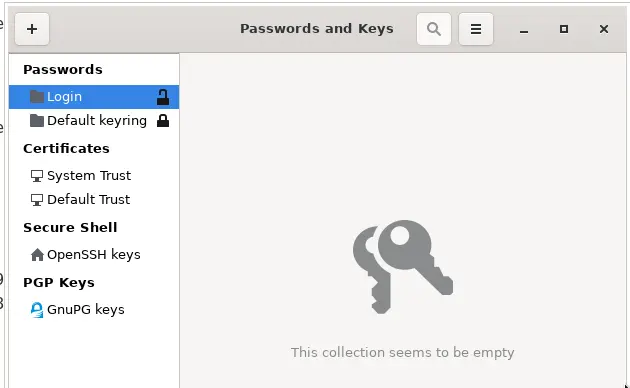
GNOME Keyring is a built in credential storage service for Linux systems running the GNOME desktop environment. It is not a traditional standalone password manager, but rather a background service that securely stores passwords, keys, and secrets used by applications and the operating system.
Below is a complete and objective overview of the main advantages and disadvantages of GNOME Keyring.
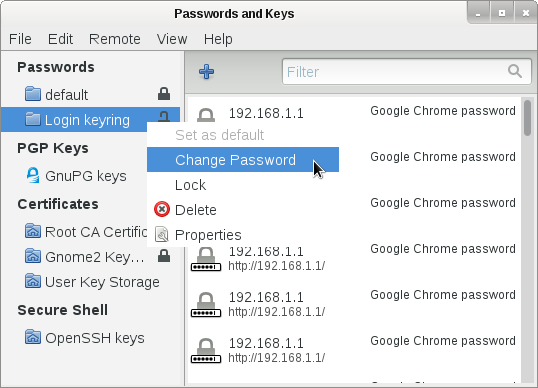
What Is GNOME Keyring
GNOME Keyring is a system component designed to:
- securely store application passwords and secrets;
- manage Wi Fi passwords, SSH keys, and certificates;
- integrate tightly with the GNOME desktop and Linux applications;
- unlock stored credentials automatically after user login.
GNOME Keyring is primarily available on Linux systems using GNOME or GNOME based desktop environments.
Core Features
- Secure storage for passwords, keys, and certificates
- Automatic unlocking after user login
- Integration with GNOME desktop and system services
- SSH key management
- Support for encrypted keyrings
- Transparent use by applications
✅ Pros of GNOME Keyring
🔐 Strong System Level Security
- Encrypted storage tied to the user account
- Uses the system login password for protection
- No plaintext storage of credentials
GNOME Keyring provides solid baseline security for Linux desktops.
🧩 Seamless GNOME Integration
- Works automatically with GNOME applications
- No manual setup required for most users
- Credentials are managed transparently in the background
💻 Lightweight and Always Available
- Runs as part of the desktop environment
- No separate installation needed on GNOME systems
- Minimal performance impact
🔑 Useful for System and Developer Tasks
- Manages SSH keys and certificates
- Stores network and application credentials
- Well suited for developers and Linux power users
💸 Free and Open Source
- Fully open source
- No subscriptions or licensing costs
- Maintained by the GNOME community
❌ Cons of GNOME Keyring
🧑💻 Not a Full Featured Password Manager
- No dedicated user friendly password vault interface
- No browser style password manager experience
- Not designed for managing large collections of website logins
🌐 Limited Cross Platform Support
- Linux only
- Not available on Windows or macOS
- No mobile support
⚙️ Basic User Controls
- Limited management options for non technical users
- Advanced configuration requires command line tools
- Less intuitive than consumer password managers
🔄 No Built In Sync
- No native cross device synchronization
- Credentials are stored locally on each machine
- Manual work required to share data across systems
Who GNOME Keyring Is Best For
Recommended if you:
- use Linux with the GNOME desktop environment;
- want secure background credential storage;
- rely on system and application level password management;
- prefer open source and integrated solutions.
Not ideal if you:
- want a cross platform password manager;
- need browser based autofill for many websites;
- want easy sync across multiple devices.
Password Manager Comparison Table 2026
|
Product Name |
Encryption & Zero-Knowledge |
Platform Support |
Key Security Features |
Best For |
|---|---|---|---|---|
|
Yes, strong AES-256 + unique secret key |
All major OS & browsers |
Zero-knowledge, MFA, passkeys, secure sharing |
Premium security & usability |
|
|
Yes, AES-256, open-source |
All major OS & browsers |
Self-hosting option, open audit |
Open-source transparency & budget |
|
|
Yes, AES-256, zero-knowledge |
All major OS & browsers |
VPN (paid), breach monitoring |
Security insights + privacy tools |
|
|
Yes, zero-knowledge |
All major OS & browsers |
Password health, email masking |
Best overall value & simplicity |
|
|
Yes, AES-256 + PBKDF2 |
All major OS & browsers |
Self-destruct, secure sharing |
Enterprise & business focus |
|
|
Yes, encrypted vault |
All major OS & browsers |
Advanced form-filling |
Excellent form automation |
|
|
AES-256 local encryption |
All major OS & browsers |
Local-first vault, optional cloud sync |
Local control, no subscription |
|
|
Yes, AES-256 GCM, open-source |
All major OS & browsers |
End-to-end encryption, CLI access |
Privacy-focused, free tier strong |
|
|
Yes, encrypted vault (mixed fields) |
All major OS & browsers |
Cross-platform sync, 2FA |
Easy access, large user base |
|
|
Yes, encrypted |
Web, apps |
Team sharing, access controls |
Business teams |
|
|
Yes, open-source |
Web & extensions |
Self-hosting, team roles |
Technical & DevOps teams |
|
|
Yes, E2E + hardware |
Web & mobile |
Hardware-first, FIDO2 |
Passwordless & simplicity |
|
|
Encrypted sync |
All major OS & browsers |
Integration with Dell ecosystem |
Enterprise users |
|
|
Encrypted |
Enterprise systems |
Active Directory integration |
Enterprise IT control |
|
|
Encrypted |
Enterprise systems |
User access & audit logs |
IT password governance |
|
|
Identity Anywhere (Avatier) |
Encrypted |
Enterprise systems |
Identity + SSO focus |
Large enterprise identity |
|
Encrypted |
Enterprise |
Identity & privileged access |
Identity security suites |
|
|
Encrypted |
All major OS & browsers |
Multiple form filling |
General personal use |
|
|
Encrypted |
Unix-like systems |
Local system vault |
Linux-centric local vault |
|
|
KeePass (via forks like KeePassXC) |
Encrypted local vault |
All major OS |
Portable, local, plugin ecosystem |
Offline control & enthusiasts |
|
Encrypted |
Teams & enterprise |
Team collaboration |
Secure team vault |
Final Verdict
GNOME Keyring is a reliable and secure system level password storage service rather than a traditional password manager. It excels at transparently handling credentials for Linux and GNOME applications, but it lacks the convenience, cross platform support, and advanced features of modern consumer password managers. It is best suited for Linux users who value native integration, simplicity, and open source software over standalone password management functionality.